Status update: 2026

Hey everyone! To reiterate my opening sentence from last time: It’s been a while since I last posted, but don’t worry, I’ve been keeping busy.

Normally, I’d dive into the technical details, but not this time. It’s been too long, there’d be too many of them, and even I don’t remember them all. I’d have to read through and summarize ~1200 commits, and if I wanted to spend my time doing that kind of thing, I’d get a job as an LLM.

Instead, how about we skip to the part everyone cares about? The Run 1 and Run 2 remakes are both close to completion, with all levels (plus Infinite Mode in Run 1) working. However, both games still have a list of issues.

Run 3 remains on the back burner until those first two are ready.

Run 1

I’ve already released an HTML5 remake of Run 1 (which I consider to have been a beta version), but since then I rewrote most of Runaway (the underlying engine), so I’ve had to redo most of Run 1 as well. It’s coming along well so far, and since I invested in building solid foundations, fixing the remaining problems should be relatively painless.

Adventure Mode is nearly done. The levels are unchanged, but I’ve been playing around with the physics, trying to make the game feel nicer but still close enough to the original. I’ve also done my best not to mess up game balance. I know people like Run 3’s physics, but those would make Run 1 too easy.
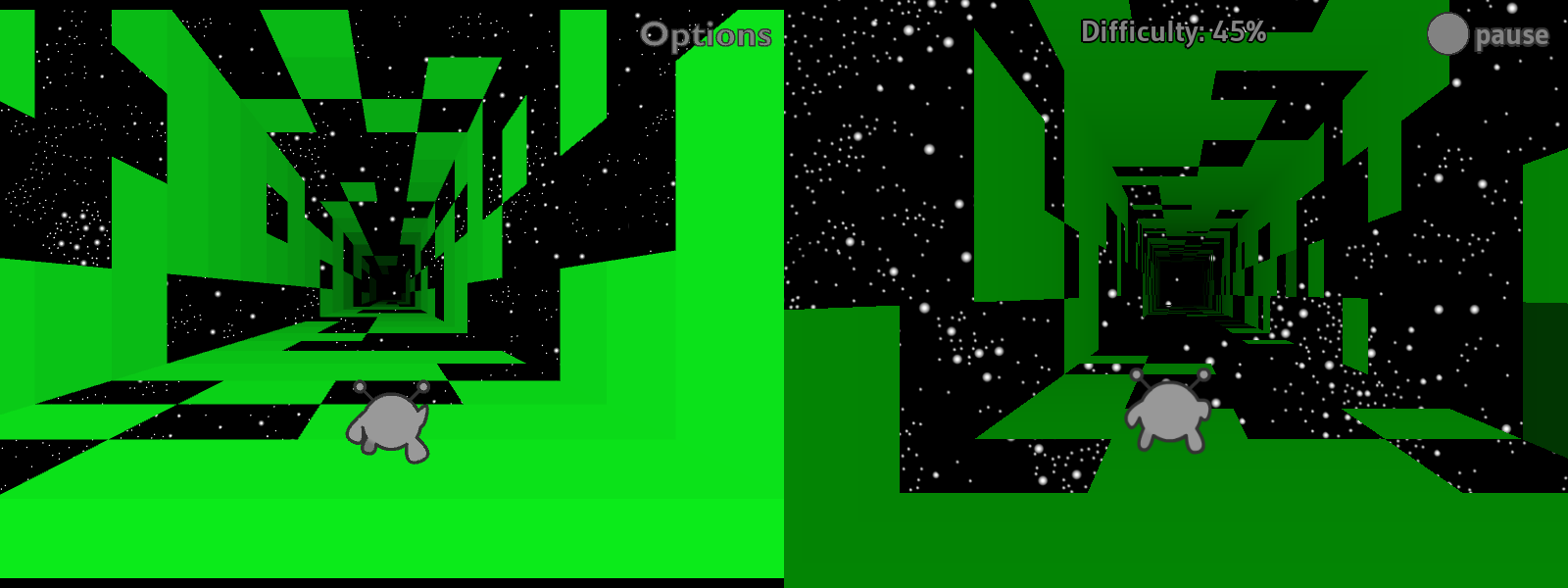
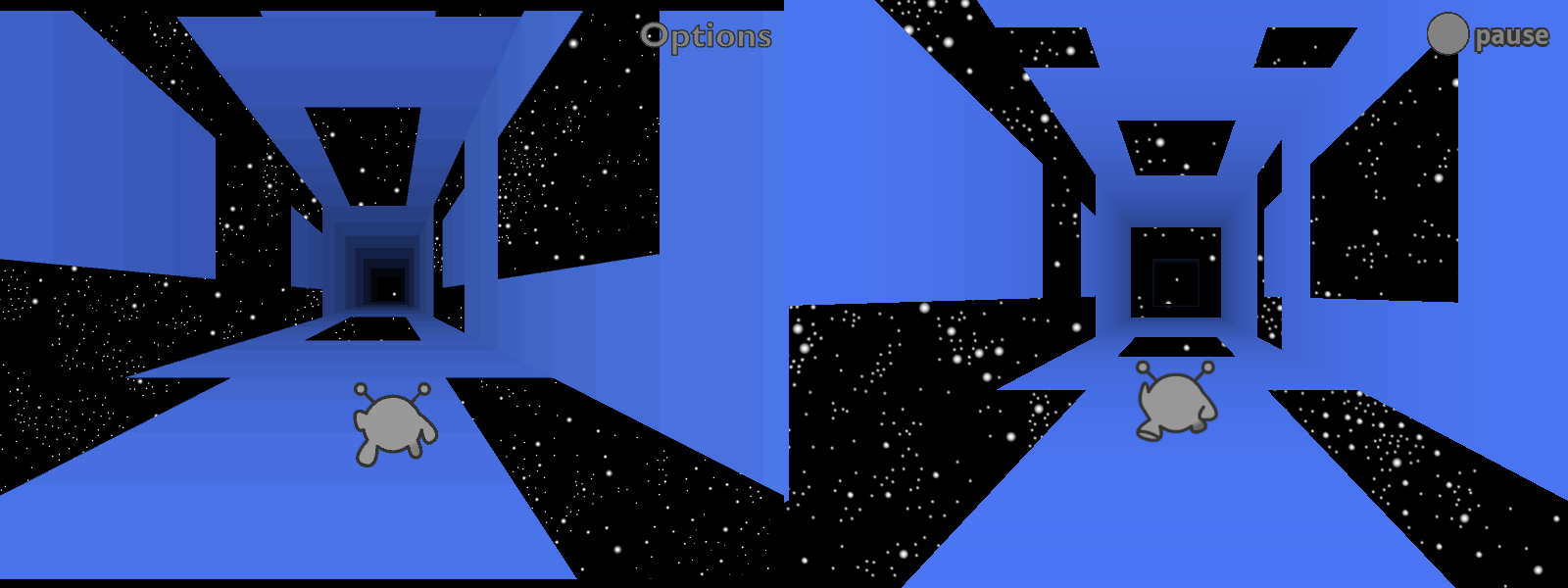
Side-by-side comparison of Level 1, near the end of the level. The images are similar, but the old one looks blockier and the Runner looks smaller, while the new one looks smoother and the Runner is closer to the center of the screen.

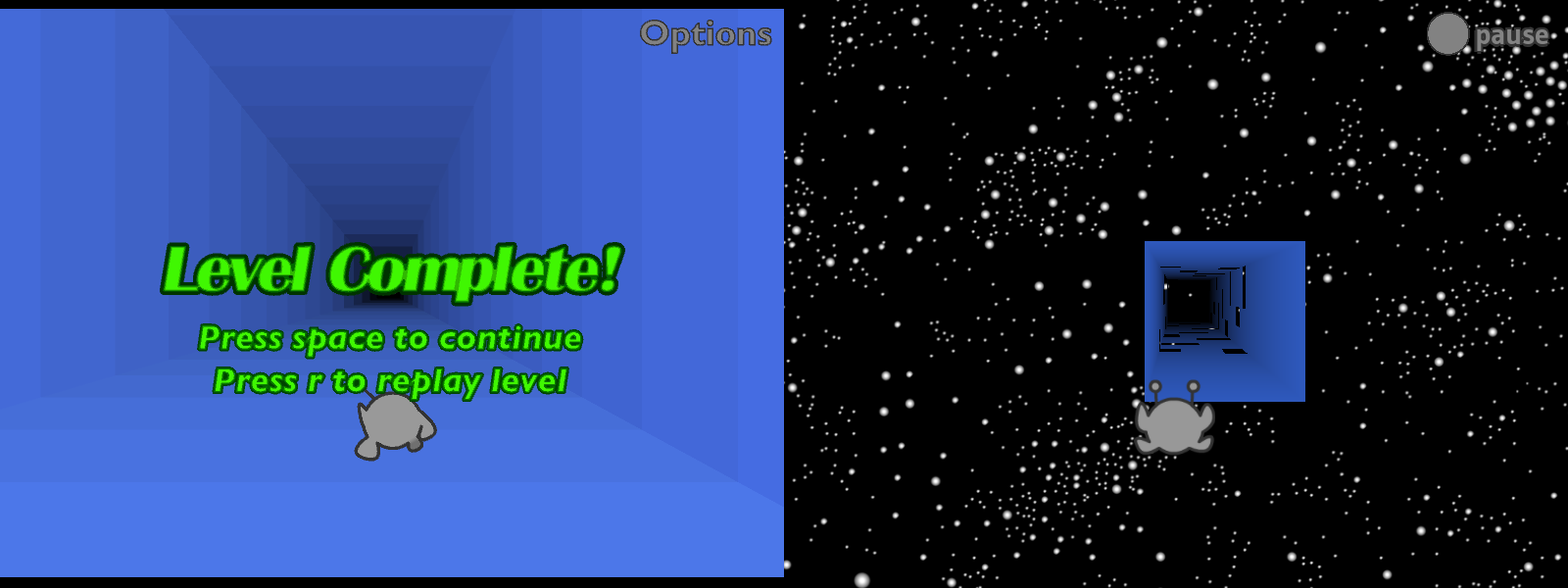
There’s still more to do for Adventure Mode. For one thing, it saves your progress but can’t load it, so you always restart from level 1. Also, there’s no ending, and the level transitions are missing something. At the moment I’m still using the “flying through space” level transition from the beta, but it’s less interesting without all the tiles zooming into place. Either I need to recreate that animation, add other scenery to look at, or go back to the original “endless tunnel” version.
Side-by-side comparison of a level transition. The old version features an endless tunnel with a text overlay instructing the player to "Press space to continue." The new version features the Runner flying through space, approaching the next level.

Infinite Mode is finally working! This one took a while.
Side-by-side comparison of Infinite Mode at 45% difficulty. The new version looks harder, but that's partially because the Runner happens to be starting on the wrong side of the tunnel.

I tried to adapt the original level generation code, but something went wrong along the way. The new generator makes levels that are both harder and less visually coherent. As for why it’s green, I haven’t gotten around to adding multiple colors yet.
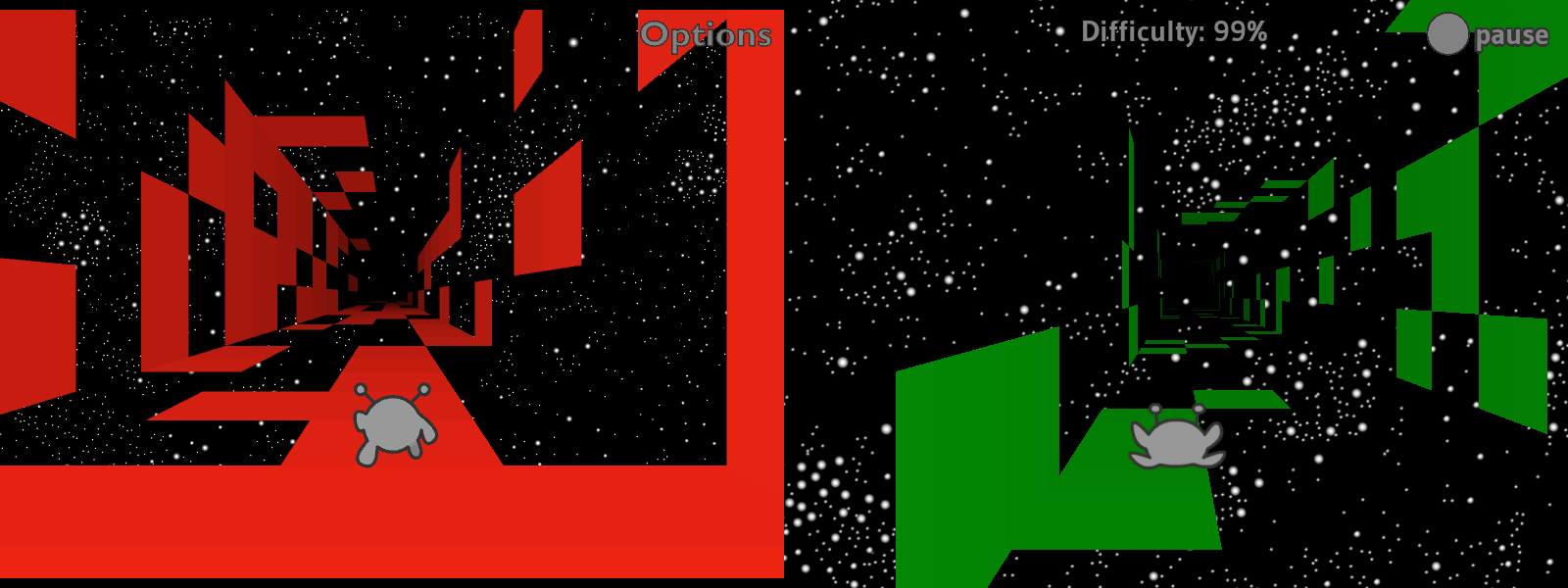
Side-by-side comparison of Infinite Mode at 99% difficulty. The old version has several clumps of tiles and at least two viable routes, whereas the new version has tiles in groups of 1-3, and fewer tiles overall. There are no good routes in sight, even if it's technically possible.

In previous status updates, I talked about how Run 1’s Infinite Mode required an overhaul of how levels were loaded. At the time, my plan was to place the levels in 3D space, loading them as soon as two conditions were met: (1) the camera was almost close enough to see them, and (2) the player beat the previous level. The original version of Run 1 would only load a new level once the previous one was over, and it’d use the player’s performance to determine the difficulty of the next level. The more you fell, the less difficulty would increase (though it would always go up by a little).

Well, I did that. And then I did something else instead. Whoops!

Now, Infinite Mode levels load based on the camera’s position (1), without waiting for you to beat the previous level (2). The difficulty increases as you make progress, and the tiles update in real time, which I think makes for a cool effect. (Also, the difficulty decreases each time you fall.)

I like this concept, and it took a fair bit of work to make it happen, but I’m not sure I like how it feels in practice. Pros: if it generates an unfair level, things will get easier once you fall off a couple times. Cons: it feels less like you’re making progress if you can just lose it again. In the original version, any progress you made was locked in. I could go back to that, but I think (hope) this should be fixable while keeping the cool new real-time updates.

Finally for Run 1, there’s currently no Edit Mode or costumes. I’ve got a working editor in Run 2, and I should be able to import that without too much trouble. Not sure what I want to do about the costumes, though. Do I keep them as costumes, or is it worth the time to flesh them out into separate characters with unique abilities?

Run 2

For those who weren’t there, in late 2024 I rebuilt Run 2 in a series of livestreams, better than before. New UI icons, touched up levels, clearer indicators of where you can and can’t rotate gravity, higher-resolution backgrounds, and a new sci-fi font.
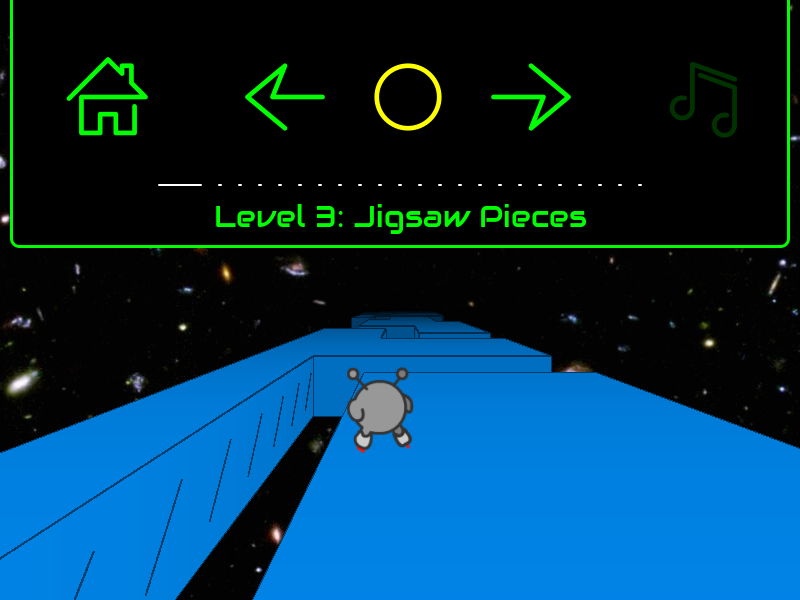
The Skater at the start of "Jigsaw Pieces." To his left is a gap in the floor; the wall of this gap is marked with diagonal slashes, indicating that if he can't catch on to that wall. The pause menu is open, showing a series of icons: a house, left and right arrows, a yellow circle, and a music note. These icons are drawn in one continuous stroke, except the note, which uses two strokes.
I’m sorry it’s taken so long to get this thing out. Many of us (me included) expected it to be out by now, but some of the remaining problems proved stubborn. At this point, I’m going to wait until I’m ready to release both remakes at once.

Here’s what was broken as of my last stream.

  • The player character stutters, as if updating at a low framerate. The rest of the game moves smoothly, so it’s not actually a performance issue. And Run 1, which is using the same engine, doesn’t have this issue. Still don’t know what’s up with this.
  • Sometimes when you deleted a cube in Edit Mode, it wouldn’t disappear, but you could fall through it. I’m happy to report that this is now fixed!
  • Sometimes when you added a new cube, nothing would show up but it would still be solid. Also fixed!
  • Often when you clicked and dragged to “paint” several cubes at once, it would place some in the wrong layer (usually one layer closer to the camera than expected). Fixed!
  • There’s no way to edit level properties (color, dimensions, title, etc.) other than manually editing the level data. I still haven’t done anything about this.
  • Though you could save levels, there was no way to load them. I’ve since added a basic text box to paste level data into, and levels do load successfully, but this promptly revealed a bunch more issues.
    • The UI isn’t built to deal with standalone levels like this, so the next/previous/bonus buttons do nothing and display incorrect data. They always indicate that there’s a previous level and that you haven’t beaten the current level or earned its bonus. When you do beat the level it says “press jump to continue,” but you just jump normally since there’s no next level to go to.
    • I didn’t program the levels to unload, so they just stay around until you quit to the main menu. This lets you load multiple levels on top of one another, though you can only interact with the most recent one.

In addition to all that, a new rendering issue popped up. If you leave a level and then navigate back to it using the pause menu, only the level’s outlines will appear. I distinctly remember having fixed this at one point, but no, it’s still here.
The Skater at the start of "3-Tuples." The cubes in the level are invisible, but the outlines are there.
This looks pretty neat in some cases, so I might add official support for it later. But I can’t keep the bug itself, as some levels lack outlines, and with neither fills nor outlines they end up being fully invisible. Good luck playing those!

As if all that wasn’t enough, I recently tried building for HTML5. It starts out in outline mode, and then the scene goes completely black if you ever move left or right. You can’t complete (or fail) the level in this state, but everything comes back if you reset, so it’s not like the game crashed. I suspect the Runner’s coordinates are getting divided by zero.
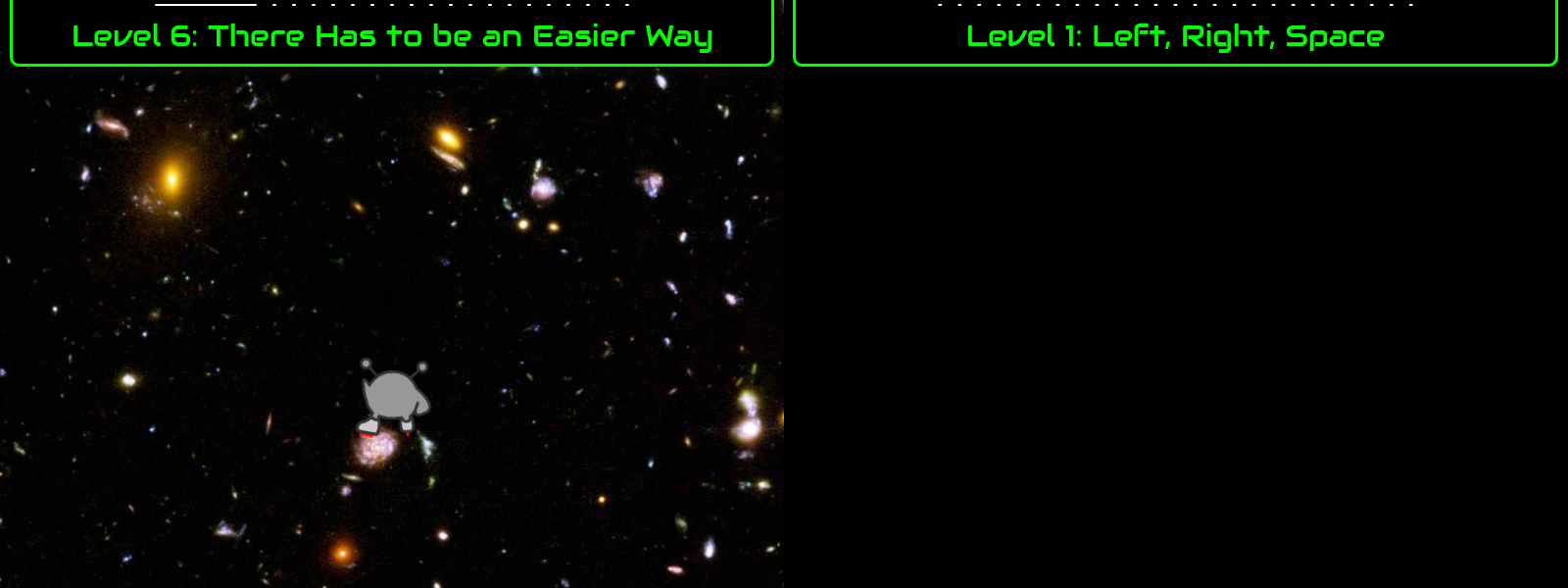
Two invisible levels. The first shows the Skater skating on nothing in "There Has to be an Easier Way." There are still background stars in that one. The second is the Runner playing "Left, Right, Space," but everything is gone: the Runner, the level, and even the background stars. Only the title bar remains.

What next?

I plan to fix everything mentioned above. When these games come out, I want you to be able to do everything you could do in the original. I’ll try to leave it at that, and not get distracted working on new features. Though it occurs to me as I write this that an “import save” feature would help a lot. Then you can pick up exactly where you left off.

I also want to do some marketing, to build interest. Keep an eye on this blog and my YouTube channel for updates.

Status update: summer 2022-winter 2023

It’s been a while since I last posted, but don’t worry, I’ve been keeping busy.

Last time, I talked about spending the first half of 2022 working on Lime. Since then, most of my changes were categorized and merged. Small bug fixes are to be released in v8.0.1, while everything that counts as a new feature will come out later in v8.1.0. Except for the two huge changes that I spent 4+ months on; those have to wait for v8.2.0 because we want more time to test them.

I spent most of the second half of 2022 on my own projects, gradually working my way up through the layers Run is built on.

Echoes

Starting in late June, I turned my focus to Echoes, which I’ve previously described as my favorite entity-component-system framework available in Haxe.

Over the summer, I rewrote and documented practically the whole codebase. I fixed bugs, cleaned up the unit tests, added new features like better timekeeping, wrote lots of documentation, and generally improved maintainability. But I never lost sight of my goal, which was to get back to work on Runaway. I only added features that I knew I’d need immediately, rather than trying to plan ahead too far.

Runaway

Between August and October, I split my time between Echoes and Runaway, gradually shifting towards the latter but going back to Echoes whenever I found a new bug or needed a new feature. And the first part of Runaway I rewrote was the math. Math is fundamental to games, and it’s worth doing right.

Take this code from my “What is Runaway?” post:

class MotionSystem extends System {
    @:update private function accelerate(acceleration:Acceleration, velocity:Velocity, time:Float):Void {
        velocity.x += acceleration.x * time;
        velocity.y += acceleration.y * time;
        velocity.z += acceleration.z * time;
    }
    
    @:update private function move(velocity:Velocity, position:Position, time:Float):Void {
        position.x += velocity.x * time;
        position.y += velocity.y * time;
        position.z += velocity.z * time;
    }
}

Here, MotionSystem performs two basic operations. First it uses Acceleration to update Velocity, then it uses Velocity to update Position. Because this code gets run every frame, it produces the appearance of 3D motion.

To keep things simple for that post, I handled x, y, and z on separate lines. However, you really shouldn’t have to do that. Any decent math library will provide a more concise option. Before August, that was this:

class MotionSystem extends System {
    @:update private function accelerate(acceleration:Acceleration, velocity:Velocity, time:Float):Void {
        Point3Utils.addProductOf(velocity, acceleration, time, velocity);
    }
    
    @:update private function move(velocity:Velocity, position:Position, time:Float):Void {
        Point3Utils.addProductOf(position, velocity, time, position);
    }
}

Convenient! I know typing out Point3Utils.addProductOf() every time could get annoying, but it still beats OpenFL’s Vector3D class:

var scaledAcceleration:Vector3D = acceleration.clone();
scaledAcceleration.scaleBy(time);
velocity.incrementBy(scaledAcceleration);

Not only is Vector3D less convenient, you have to make a temporary object. For one object that’s fine, but video games can do hundreds if not thousands of these operations per second, and all of those temporary objects have to be garbage collected.

It’s at least possible to make Vector3D more convenient. Just add a “scaledBy()” function that calls clone() and then scaleBy(), combining lines 1 and 2 above. It still has the garbage collection problem, but at least the code looks neater:

velocity.incrementBy(acceleration.scaledBy(time));

But wait! It turns out you can avoid the garbage collection problem too, using inline constructors.

If we inline Vector3D’s constructor and functions, then the Haxe compiler will copy all that code into our function call. After moving the code, the compiler will be able tell that the clone is temporary, and doesn’t actually need to be allocated. Instead, the compiler can allocate local x, y, and z variables, which incur no garbage collection at all. Sadly, pretty much none of Vector3D is inlined (either for backwards compatibility reasons or because this isn’t a priority for OpenFL).

So I looked elsewhere. As luck would have it, the hxmath library provides a fully-inline Vector3 type. Not only does this solve the garbage collection issue, hxmath’s Vector3 offers a lot more features than OpenFL’s Vector3D. (IMO, hxmath is the best math library on Haxelib. Not that there’s much competition.) In particular, it allows you to use operators wherever such operators make sense:

class MotionSystem extends System {
    @:update private function accelerate(acceleration:Acceleration, velocity:Velocity, time:Float):Void {
        velocity += acceleration * time;
    }
    
    @:update private function move(velocity:Velocity, position:Position, time:Float):Void {
        position += velocity * time;
    }
}

(As of this writing, the += operator isn’t available on Haxelib. But it should come out in the next release.)

I initially planned to join forces, submitting improvements to hxmath rather than creating yet another math library. I submitted fixes for the bugs I found, but as I looked closer I started to find more and more things I’d do differently, as well as a couple inconsistencies. Anyone already using hxmath wouldn’t like sudden changes to function names or the order of a matrix’s elements. Breaking changes are always a hard sell, and I’d need to make a lot of them before I could use hxmath for Runaway.

So I began working on my own math library (working name “RunawayMath”), using the knowledge of macros I gained from working on Echoes. Specifically, I wrote macros to handle the repetitive parts. For instance, my Vector3 class can do in 13 lines what hxmath does in ~55.

@:elementWiseOp(A + B) @:inPlace(add)
private inline function sum(other:Vector3):Vector3;

@:elementWiseOp(A - B) @:inPlace(subtract)
private inline function difference(other:Vector3):Vector3;

@:elementWiseOp(A * B) @:commutative @:inPlace(multiply)
private inline function product(other:Vector3):Vector3;

@:elementWiseOp(A * B) @:commutative @:inPlace(multiplyF)
private inline function productF(scalar:Float):Vector3;

@:elementWiseOp(A / B) @:inPlace(divide)
private inline function quotient(other:Vector3):Vector3;

@:elementWiseOp(A / B) @:inPlace(divideF)
private inline function quotientF(scalar:Float):Vector3;

@:elementWiseOp(-A) private inline function inverse():Vector3;

@:elementWiseOp(A + B) tells the macro that when you type vectorA + vectorB, it should make a new vector with the sum of their elements (vectorA.x + vectorB.x, vectorA.y + vectorB.y, and vectorA.z + vectorB.z). @:inPlace tells the macro to enable the corresponding assign operator (+= and so on).

With macros in place, I was able to quickly churn out data types. First I re-implemented most of hxmath’s types, like vectors, lines, and quaternions (but skipped matrices because I don’t need them yet). Then, I added brand new ones, including spheres, planes, orthonormal bases, bivectors, and Bézier curves. At some nebulous point in the future, I plan to implement matrices and rotors.

I made sure to write unit tests as I went, something I’d never bothered with before. As a result, I’m confident that these new types will be less buggy than my old code. Notably, Run 1’s beta lacks shadows due to some sort of error in either my raycast code or my quaternion code. I never managed to find the issue, but I bet my new code will fix it without even trying.

I could go on about all the new features, but I really should save that for some other post.

Practical applications

By November, I was ready to start making use of all this mathematical awesomeness, by returning to the fundamentals of any platformer: running and jumping.

Well, running specifically. It’s the name of the game, after all!

Side-to-side movement

It isn’t really a secret that Run 1’s HTML5 beta looks and feels different from the Flash version, and part of that is the way the Runner moves side-to-side.

The old formula for acceleration (in Flash) used the slow Math.pow() function to produce a specific feeling. When I used a totally different function in HTML5, it produced a different feeling. I did that because I figured that if Run 3 didn’t need Math.pow(), Run 1 didn’t either. Problem was, I wasn’t very careful writing the new formula.

Now back to November 2022. This time, I wanted to try a suggestion I read in an article or social media comment. The idea is to graph speed vs. time, letting you see (and edit) how fast the player character accelerates.

The simplest case is constant acceleration. You gain the same speed every frame (until you reach the maximum), producing a straight line on the graph.

But that’s restrictive, so what about curved acceleration? Specifically, how about using those Bézier curves I mentioned above? It’s easy to get acceleration from a curve that represents velocity, and it lets me play around with a lot of options to see how they all feel.

And that’s without even changing the top speed or acceleration duration. I meant it when I said a lot of options. (Click to view.)

Out of all those options, I think the ones with high initial acceleration (convex shapes) feel the most natural.

The initial burst makes the controls feel more responsive, and then they gently approach the top speed so there’s no sudden jerk. Not only that, it’s true to life: as someone picks up speed in real life, air resistance gets stronger and they accelerate slower.

That said, the curves I showed above are extreme examples. Usually I aim for a bit less acceleration at first and leave a bit of jerk at the end. That way, it’s more obvious that you’re continuing to gain speed over time.

I don’t know which of these most closely matches the original Run 1, but I plan to find out.

Other basic components

By the way, my colorful-square demo app is more than just a rolling simulator. It’s actually a small platformer demo, with collisions and jumping and all that. Just… without any actual platforms, yet.

The “Mobility” button brings up the acceleration graph I’ve already shown. The “Jump” button lets you control how high each type of jump goes (or to disable specific types such as midair jumps). “Air” lets you tweak air resistance and wind speed.

But that’s far from all the components that went into this app. I also took the chance to rewrite and test each of the following:

  • Collisions, both for the invisible walls around the edges and for the boost pads in the middle. Solid collisions are automatically classified as “ground,” “wall,” or “ceiling,” making it easy to write ground-specific or wall-specific behavior. Like the walljump seen above.
  • Friction, including friction with moving platforms. A moving platform will pull you along with it (unless it’s icy), and you’ll keep that momentum if you jump. (I expect to use this for conveyors in Run 3.)
  • A brand new Orientation class that replaces the coordinate space approach I used to use. Turns out I was making things unnecessarily hard for myself, rotating the character’s coordinates rather than rotating the effects of the left/right/jump buttons.

How long can player_03 keep stalling?

As of this moment, I’m running dangerously low on things to do before I get back to work on Run 1. I’ve been putting that off working hard on underlying projects since… summer 2021? It’s certainly taken a while, but soon I’ll be done stalling preparing.

  • When Infinite Mode didn’t work, I could have looked for an easy workaround. Instead, I rewrote all loading code.
  • When I realized loading is best done using threads, I could have just used the tools that existed. Instead, I spent several months revising Lime’s threading classes and adding HTML5 support.
  • I made a decent-size demo project just to show off the new thread code. That took at least a month on its own, and I have no immediate plans for it, but at least it made pretty patterns.
  • I spent months cleaning up Lime’s submodule projects instead of leaving well enough alone. Now, I know more about this section of the code than almost anyone else, so I’m the one responsible for any new bugs that come up. Fortunately there haven’t been too many.
  • I spent over a month (hard to measure because it’s spread out) updating Echoes, even though it demonstrably already worked. It had a couple hiccups, sure, but I could have fixed those without rewriting all the documentation and unit tests. But hey, now we have more documentation and unit tests!
  • When I discovered constructor inlining, I dropped everything to rewrite Runaway’s math classes. They already worked fine, but nooo, the code was a little bit verbose, we couldn’t have that!
  • With new math classes available and a vague sense that I was overcomplicating space, I stumbled across the term orthonormal basis. And that inspired me to rethink the concepts of space, collisions, moving, and jumping all at once. I’m going to need to write a whole new “how space works in Run” post…
  • To take advantage of all this new code, I wrote the demo app shown above. It took about as long as the libnoise demo, but at least this time I plan to keep using it.
  • When first making the demo, I enabled one system at a time, so that I’d only have to debug one section of code at a time. Eventually, I decided just to enable all the systems from the Run 1 beta, even knowing I’d immediately get dozens if not hundreds of errors. I figured it’d let me keep stalling for a while longer locate lots of bugs all at once.

I estimate that fixing that last batch of bugs will take at least… oh. Uh, they’re already done. Took less than a week. I guess there was a benefit to all that feature creep careful planning and solid mathematical foundations.

Except, that is, for one single system. This system was especially complicated, and since I wanted to post this post, I left it commented out. Once I get this system working, I think that will be everything: I’ll be unable to keep stalling ready to work on Run 1.

I’ll be ready to polish the wonky character animations, make the motion feel more like it used to, and, of course, update the level load system to handle Infinite Mode levels, all those things I’ve been saying I want to do. But first, I need to fix up this one complicated system.

So which system is it? It is, in fact…

…the level loading system. Also, the only reason it’s so broken is because I made those other changes to how loading works. Fixing the errors will automatically also make the system compatible with Infinite Mode.

Huh. I guess that means I’m already done stalling. No more redoing old features, I’m officially now working on the thing that started this entire multi-year rabbit hole. Or maybe I could go implement rotors first… One more detour…

Status update: spring 2022

Last time, I said I was done with rabbit holes. I was wrong. Turns out, after escaping one rabbit hole, I promptly fell down the next.

First it was threads. I spent all of March working on an app to demonstrate threads in action. Sure I probably spent more time on it than strictly necessary, but I got a cool demo out of it. Plus, working on a practical example helps catch bugs and iron out rough edges.

With that done, I turned my focus to updating the 21 C++ libraries Lime uses. (Well, 19 out of the 21, anyway.) I forget exactly why I decided it needed to be done then and there, but I think a big part was the fact that people were raising concerns about large unresolved problems in OpenFL/Lime, and this was one I could solve. Technically I started last year, and this was me rolling up my sleeves and finishing it.

A couple stats for comparison: I spent ~4 months working on threads, and produced 53 commits. I spent ~2.5 months working on the C++ libraries, and produced 102 commits. And that’s why you can’t measure effort purely based on “amount of code written.” The thread classes took far more effort to figure out, but a lot of that effort was directed into figuring out which approach to take, and I only committed the version I settled on. The alternative options silently vanished into the ether.

All the while, I spent bits of time here and there working on issue reports. Tracking down odd bugs, adding small features, stuff like that. There are several changes in the pipeline, and if you want the technical details, check out my other post. (Scroll to the bottom for more on the big 19-library update.)

Big changes coming Lime’s way

Lime hasn’t received a new release version in over a year, even though development has kept going the whole time. As we gear up for the next big release, I wanted to take a look at what’s on the way.

Merged changes

These changes have already been accepted into the develop branch, meaning they’ll be available in the very next release.

Let’s cut right to the chase. We have a bunch of new features coming out:

  • 80f83f6 by joshtynjala ensures that every change submitted to Lime gets tested against Haxe 3. That means everything else in this list is backwards-compatible.
  • #1456 by m0rkeulv, #1465 by me, and openfl#2481 by m0rkeulv enable “streaming” music from a file. That is to say, it’ll only load a fraction of the file into memory at a time, just enough to keep the song going. Great for devices with limited memory!
    • Usage: simply open the sound file with Assets.getMusic() instead of Assets.getSound().
  • #1519 by Apprentice-Alchemist and #1536 by me update Android’s minimum-sdk-version to 21. (SDK 21 equates to Android 5, which is still very old. Only about 1% of devices still use anything older than that.) We’re trying to strike a balance between “supporting every device that ever existed” and “getting the benefit of new features.”
    • Tip: to go back, set <config:android minimum-sdk-version="16" />.
  • #1510 by ninjamuffin99 and Cheemsandfriends adds support for changing audio pitch. Apparently this feature has been missing since OpenFL 4, but now it’s back!
    • Usage: since AS3 never supported pitch, OpenFL probably won’t either. Use Lime’s AudioSource class directly.
  • 81d682d by joshtynjala adds Window.setTextInputRect(), meaning that your text field will remain visible when an onscreen keyboard opens and covers half the app.
  • #1552 by me adds a brand-new JNISafety interface, which helps ensure that when you call Haxe from Java (using JNI), the code runs on the correct thread.
    • Personal story time: back when I started developing for Android, I couldn’t figure out why my apps kept crashing when Java code called Haxe code. In the end I gave up and structured everything to avoid doing that, even at the cost of efficiency. For instance, I wrote my android6permissions library without any callbacks (because that would involve Java calling Haxe). Instead of being able to set an event listener and receive a notification later, you had to actively call hasPermission() over and over (because at least Haxe calling Java didn’t crash). Now thanks to JNISafety, the library finally has the callbacks it always should have had.
  • 2e31ae9 by joshtynjala stores and sends cookies with HTTP requests. Now you can connect to a server or website and have it remember your session.
  • #1509 by me makes Lime better at choosing which icon to use for an app. Previously, if you had both an SVG and an exact-size PNG, there was no way to use the PNG. Nor was there any way for HXP projects to override icons from a Haxelib.
    • Developers: if you’re making a library, set a negative priority to make it easy to override your icon. (Between -1 and -10 should be fine.) If you aren’t making a library and are using HXP, set a positive priority to make your icon override others.

…But that isn’t to say we neglected the bug fixes either:

Pull request #1517 by Apprentice-Alchemist is an enormous change that gets its own section.

For context, HashLink is the new(er) virtual machine for Haxe, intended to replace Neko as the “fast compilation for fast testing” target. While I find compilation to be a little bit slower than Neko, it performs a lot better once compiled.

Prior to now, Lime compiled to HashLink 1.10, which was three years old. Pull request #1517 covers two versions and three years’ worth of updates. From the release notes, we can look forward to:

  • new HashLink CPU Profiler for JIT
  • improved 64 bit support – windows release now 64 bit by default
  • new GC architecture and improvements / bugs fixes
  • support for hot reload
  • better stack primitives for faster haxe throw
  • captured stack for closures (when debugger connected)
  • and more!

(As someone who uses HashLink for rapid testing, I’m always happy to see debugging/profiling improvements.)

Apprentice-Alchemist put a lot of effort into this one, and it shows. Months of testing, responding to CI errors, and making changes in response to feedback.

Perhaps most importantly in the long run, they designed this update to make future updates easier. That paid off on April 28, when HashLink 1.12 came out at 3:21 PM GMT, and Apprentice-Alchemist had the pull request up to date by 5:45!

Pending changes

Lime has several pull requests that are – as of this writing – still in the “request” phase. I expect most of these to get merged, but not necessarily in time for the next release.

Again, let’s start with new features:

…And then the bug fixes:

  • #1529 by arm32x fixes static debug builds on Windows.
  • #1538 by me fixes errors that came up if you didn’t cd to an app’s directory before running it. Now you can run it from wherever you like.
  • #1500 by me modernizes the Android build process. This should be the end of that “deprecated Gradle features were used” warning.

Submodule update

#1531 by me is another enormous change that gets its own section. By far the second biggest pull request I’ve submitted this year.

Lime needs to be able to perform all kinds of tasks, from rendering image files to drawing vector shapes to playing sound to decompressing zip files. It’s a lot to do, but fortunately, great open-source libraries already exist for each task. We can use Cairo for shape drawing, libpng to open PNGs, OpenAL to play sound, and so on.

In the past, Lime has relied on a copy of each of these libraries. For example, we would open up the public SDL repository, download the src/ and include/ folders, and paste their contents into our own repo. Then we’d tell Lime to use our copy as a submodule.

This was… not ideal. Every time we wanted to update, we had to manually download and upload all the files. And if we wanted to try a couple different versions (maybe 1.5 didn’t work and we wanted to see if 1.4 was any better), that’s a whole new download-upload cycle. Plus we sometimes made little customizations unique to our copy repos. Whenever we downloaded fresh copies of the files, we’d have to patch our customizations back in. It’s no wonder no one ever wanted to update the submodules!

If only there was a tool to make this easier. Something that can download files from GitHub and then upload them again. Preferably a tool capable of choosing the correct revision to download, and merging our changes into the downloaded files. I don’t know, some kind of software for controlling versions…

(It’s Git. The answer is Git.)

There was honestly no reason for us to be maintaining our own copy of each repo, much less updating our copies by hand. 20 out of Lime’s 21 submodules have an official public Git repo available, and so I set out to make use of them. It took a lot of refactoring, copying, and debugging. A couple times I had to submit bug reports to the project in question, while other times I was able to work around an issue by setting a specific flag. But I’m pleased to announce that Lime’s submodules now all point to the official repositories rather than some never-updated knockoffs. If we want to use an update, all we have to do is point Lime to the newer commit, and Git will download all the right files.

But I wasn’t quite done. Since it was now so easy to update these libraries, I did so. A couple of them are still a few versions out of date due to factors outside of Lime’s control, but the vast majority are fully up-to-date.

Other improvements that happened along the way:

  • More documentation, so that if anyone else stumbles across the C++ backend, they won’t be as lost as I was.
  • Support for newer Android NDKs. Well, NDK 21 specifically. Pixman’s assembly code prevents us from updating further. (Still better than being stuck with NDK 15 specifically!)
  • Updating zlib fixes a significant security issue (CVE-2018-25032).

Looking forward

OpenFL and Lime are in a state of transition at the moment. We have an expanded leadership team, we’ll be aiming for more frequent releases, and there’s plenty of active discussion of where to go next. Is Lime getting so big that we ought to split it into smaller projects? Maybe! Is it time to stop letting AS3 dictate what OpenFL can and can’t do? Some users say so!

Stay tuned, and we’ll find out soon enough. Or better yet, join the forums or Discord and weigh in!

A problem not worth solving

I spent most of Thursday working on a problem. After about ten hours of work, I reverted my changes. Here’s why.

The problem

This past week or so, I’ve been working on a new HTML5Thread” class. One of Lime’s goals is “write once, deploy anywhere,” so I modeled the new class after the existing Thread class. So if you write code based on the Thread class, I want that same code to work with HTML5Thread.

For instance, the Thread class provides the readMessage() function. This can be used to put threads on pause until they’re needed (a useful feature at times), and so I set out to copy the function. In JavaScript, if you want to suspend execution until a message arrives, you use the appropriately-named await keyword.

Just one little problem. The await keyword only works inside an async function, and there’s just no easy way to make those in Haxe. You’d have to modify the JavaScript output file directly, and that’s multiple megabytes of code to sift through.

My solution

At some point I realized that while class functions are difficult, you can make async local functions without too much trouble.

With a workaround in mind, I thought about how best to add it to Lime. As mentioned above, Lime is designed around the assumption that everything should be cross-platform. So if I was going to support async functions in JavaScript, I wanted to support them on all targets.

It would be easy to use: call Async.async() to make an async function, then call Async.await() to wait for something. These functions would then use some combination of JavaScript keywords, Lime Futures, and macro magic to make it happen. You wouldn’t have to worry about the details.

To make a long story short, it almost worked.

The problems with my solution

  1. My solution was too complicated.
  2. My solution wasn’t complicated enough.

My code contained a bunch of little “gotchas”; there were all kinds of things you weren’t allowed to do, and the error message was vague. “Invalid location for a call to Async.await().” Then if you wanted to use the await keyword (which is kind of the point), you had to write JavaScript-specific code (which is against Lime’s design philosophy). Oh, and there were a couple other differences between platforms.

From the user’s point of view, it was too complicated. But the only way to make it simpler would be to add a lot more code under the hood, so in a way, it also wasn’t complicated enough.

Doing this right would take a whole library’s worth of code and documentation, and as it turns out, that library already exists.

Perspective

In my last post, I quoted Elon Musk saying “First, make your requirements less dumb.” But as I said, I don’t think that’s the right order of operations. I mean, yeah, start out with the best plan you can make. But don’t expect to plan correctly first try. You need perspective before you can get the requirements right, and the easiest way to get perspective is to forge ahead and build the thing.

For instance, when I started this detour, I had no idea there might be valid and invalid locations to call Async.await(). That only occurred to me after I wrote the code, tried experiments like if(Math.random() < 0.5) Async.await(), and saw it all come crashing down. (Actually it wasn’t quite that dramatic. It just ran things out of order.)

Ten hours of work later, I have a lot more perspective. I can see how big this project is, how hard the next steps will be, and how useful users might find it. Putting all that together, I can conclude that this falls firmly in the category of feature creep.

Lime doesn’t need these features at the moment. Not even for my upcoming HTML5Thread class. All that class needs is the async keyword in one specific spot, which only takes eight lines of code. Compare that to my original solution’s 317 lines of code that still weren’t enough!

Basically what I’m saying is, I’m glad I spent the time on this, because I learned worthwhile lessons. I’m also glad I didn’t spend more than a day on it.

On starting over

(Don’t panic, I’m not personally starting over.)

How many of you have heard of the band Wintergatan?

Martin Molin, the face of Wintergatan, is a musician/engineer who rose to Internet fame after building the “Marble Machine” you see above. I assume you can tell why – that thing is really cool.

Sadly, from an engineering standpoint, the machine was a nightmare. Only capable of playing songs very similar to the one it was built for, and held together with elbow grease and wishful thinking. Marbles could collide if it tried to play adjacent notes, it was hard to time the notes properly, and the marbles kept clogging up or spilling out.

So he started over.

Marble Machine X

On January 1 2017, Martin announced the Marble Machine X, an entirely new device that would fix all the flaws in the original. Over the next four and a half years, he posted regular development updates. Even if – like me – you only watched some of the videos, you’d still learn a lot about both the MMX and mechanical engineering.

Martin went all out this time around, using CAD and CNC to build parts with millimeter precision, prototyping five different versions of a single piece so he could test them side-by-side, taking hours of video footage and building enormous spreadsheets with the data, measuring exactly how many milliseconds early or late the notes were, and taking design suggestions from a worldwide community of engineers. Most of all, he was unafraid to remove parts that he’d spent weeks or months on, if they weren’t quite working right.

It’s not really awesome to spend one and a half weeks building something that you have to redo, but I’m really used to that, and I’m actually good at starting over… I’m not so interested in this machine if it doesn’t play good music.

-Part of Martin’s heartfelt speech. (Make sure to watch the video for the rest.)

He sure did start over. Often enough that his angle grinder and “pain is temporary” catchphrase became a community meme, and then ended up on merchandise.

Was it worth it? Oh yeah. Looking at his last edited video before he switched to raw streams, the MMX ended up as an engineering marvel. Not only does it look great, it can drop thousands of marbles without error. When there is an error (5:26), he can instantly diagnose the problem and swap out the parts needed to fix it, no angle grinder necessary. Immediately after fixing it, he tried again and dropped thirty thousand in a row with zero errors. Four years well spent, I’d say!

So, just this January, it occurred to me that I hadn’t heard from Martin since that last video. The one posted all the way back in June. I didn’t mean to forget about him. In fact, I’m subscribed. Sure I skipped all the streams, but why did he stop posting edited videos?

A Lesson in Dumb Design

Wintergatan’s latest video, posted last September, has the answers. It’s titled “Marble Machine X – A Lesson in Dumb Design,” and in it, Martin discusses “dumb requirements” in the MMX.

First, make your requirements less dumb. Your requirements are definitely dumb. It does not matter who gave them to you; it’s particularly dangerous if a smart person gave you the requirements, because you might not question them enough. […] It’s very common; possibly the most common error of a smart engineer is to optimize the thing that should not exist.

-Elon Musk

Leaving aside Elon Musk himself, this seems like good advice. Martin gives an example of how it applies to the MMX at 5:49: he’s built the machine based off the fundamental assumption that marbles should always follow constrained single-file pathways. All the situations he’s encountered over the years where marbles would clog up, or apply pressure to a piece of tubing and burst out, or clog up, or jump over dividers, or clog up – all of these situations resulted from trying to constrain the marbles more than necessary.

Most were fixable, of course. He’s got well over a hundred videos’ worth of solved problems. But as he graduated from testing a few marbles per second to playing entire songs, he discovered more and more things wrong. Eventually, he concluded that the MMX, despite all the work put into it, wasn’t fixable. Now, he’s planning to produce one complete song with it, and then – once again – start over.

Judging by the YouTube comments, the community did not take this news well.

Drummers lose drum sticks. Violinists break bows. Guitarists lose picks. The marble machine can drop a marble.

-Thomas R

The MMX is literally almost complete and could be complete if only you allowed for a margin of error and stopped reading into all these awful awful self-help books.

-rydude998

“Make requirements less dumb” is a fantastic approach, but please don’t forget that “looks cool” is not a dumb requirement for your project.

-David H (referring to when Martin talked about form vs. function)

The perfect marble machine isn’t going to happen unless you seriously water down the beautiful artistic aspects that made the MMX so special to begin with. If that’s what it takes, then what’s the point? You’ll have a soulless husk of what was previously a wonderful and inspiring piece of art.

-BobFoley1337

This is the story of an artist who became an engineer to build his art and in so doing forgot the meaning of art.

-Nick Uhland

Note: If I quoted you and you’d rather I didn’t, let me know and I’ll take it down.

All good points. I’m not necessarily on board with the tone some of them took, but can you blame them? The project seemed so close, and so many people were excited to see the culmination of all this work, and then Martin pulls the rug out from under everyone.

But before we judge, let’s hear Martin’s side of the story:

I got many ideas for how to design a simpler, functional Machine, and I can’t stop thinking about it. I have heard that when you build your third house, you get it right. I think the same goes for Marble Machines.

[…]

I do know the generous response and objections that most crowdfunders have when I describe the Marble Machine X as a failure, and you are all correct. Its not a complete failure. What I have learned in the MMX process is the necessary foundation for the success of MMX-T.

[…]

If it’s hard to understand this decision let me provide some context: The MMX looks like it is almost working, but it isn’t. The over-complex flawed design makes the whole machine practically unusable. I now have the choice between keeping patching up flaws, or turn a page and design a machine which can be 10X improved in every aspect.

This may not be surprising coming from the guy who built four entire game engines between the three Run games, but I’m sympathetic to Martin. I know all too well that a thing that looks almost perfect from an outsider’s perspective can be a mess inside.

The Codeless Code: Case 105: Navigation

The Codeless Code is a collection of vaguely-Zen-like stories/lessons about programming. The premise is odd at first, but just go with it.

A young nun approached master Banzen and said:

“When first presented with requirements I created a rough design document, as is our way.

“When the rough design was approved I began a detailed design document, as is our way. In so doing I realized that my rough design was ill-considered, and thus I discarded it.

“When the detailed design was approved I began coding, as is our way. In so doing I realized that my detailed design was ill-considered, and thus I discarded it.

“My question is this:

“Since we must refactor according to need, and since all needs are known only when implementation is underway, can we not simply write code and nothing else? Why must we waste time creating design documents?”

Banzen considered this. Finally he nodded, saying:

“There is no more virtue in the documents than in a handful of leaves: you may safely forgo producing either one. Before master Mugen crossed the Uncompiled Wasteland he made eight fine maps of the route he planned to take. Yet when he arrived at the temple gates he burned them on the spot.”

The nun took her leave in high spirits, but as she reached the threshold Banzen barked: “Nun!”

When the nun turned around, Banzen said:

“Mugen was only able to burn the maps because he had arrived.”

I hope the analogy here is clear. When Martin built the original Marble Machine, he produced a single song and retired it. He then built the Marble Machine X, and plans to produce a single song before retiring it too. Now he’s working on the Marble Machine X-T, and he’s hoping that “when you build your third house, you get it right” applies here too.

He could never have made it this far if not for the first two machines. If he hadn’t built the original, he wouldn’t have known where to start on the second. If not for spending years on the MMX fixing all kinds of issues and making it (seemingly) almost work, he wouldn’t know where to start designing the third. Years of building the machine gave him a clearer picture than any amount of planning, and that picture is the only reason he can perform the “first” step of making his requirements less dumb.

I don’t think Martin could have gotten the requirements right on his first or second try, but it’s good that he tried. That was the other point of the “Navigation” parable. Mugen was only able to burn the maps because he had arrived. If Martin hadn’t started by making a solid plan, the MMX could not have been as good as it ended up being. If the MMX hadn’t reached the point of “almost working,” its greatest flaws wouldn’t have been exposed.

The Codeless Code: Case 91: The Soul of Wit

And now we arrive at how this relates to my own work. As I said at the beginning, I’m not starting anything over. However, I recently realized I needed to pivot a little.

I had built my code one feature at a time. Like Martin testing 30,000 marbles, I tested simple cases, over and over, and they worked. Then, like Martin livestreaming actual music, I devised a real-world example. It was basic, but it was something someone might actually want to do.

And that led to a cascade of problems. Things I hadn’t thought of while planning but which were obvious in retrospect. Problems with easy solutions. Problems with hard solutions. All kinds of stuff.

I was capable of fixing these problems. In fact, I had a couple different avenues to explore; at least one would certainly have worked. How could I be so certain I was on the wrong track?

Wangohan […] emailed his predicament to the telecommuting nun.

“I know nothing of this framework,” the nun wrote back. “Yet send me your code anyway.”

Wangohan did as he was asked. In less than a minute his phone rang.

“Your framework is not right,” said Zjing. “Or else, your code is not right.”

This embarrassed and angered the monk. “How can you be so certain?” he demanded.

“I will tell you,” said the nun.

Zjing began the story of how she had been born in a distant province, the second youngest of six dutiful daughters. Her father, she said, was a lowly abacus-maker, poor but shrewd and calculating; her mother had a stall in the marketplace where she sold random numbers. In vivid detail Zjing described her earliest days in school, right down to the smooth texture of the well worn teak floors and the acrid yet not unpleasant scent of the stray black dog that followed her home in the rain one day.

“Enough!” shouted the exasperated Wangohan when a full hour had passed, for the nun’s narrative showed no sign of drawing to a close. “That is no way to answer a simple question!”

“How can you be so certain?” asked Zjing.

I was writing a tutorial as I went, and that’s what tipped me off.

Each time I came up with a workaround, I had to imagine explaining it in the tutorial: “If you’re using web workers and passing a class instance from your main class to your web worker, you’ll need to add that class to the worker’s header, and then call restoreInstanceMethods() after the worker receives it. This is enough if that’s the only class you’re using but fails if you’re using subclasses that override any of the instance methods, so in that case you also need to these five other steps…”

Which is a terrible tutorial! Way too complicated. My framework was not right, or else, my code was not right. It was time to step back and rethink my requirements.

A mistaken assumption

When this all began, I had one goal: fulfill Lime issue #1081: Add asynchronous worker support for the HTML5 target. This core goal led to all my other requirements:

  1. Use web workers.
  2. Maintain backwards compatibility.
  3. Match Lime’s coding style.
  4. Write easy-to-use code.

Clearly, I was already violating requirement #4. And a couple weeks ago, I’d also realized that #1 and #2 were incompatible. Web workers were always going to break existing code, which is why I’d made them opt-in. You can’t use them by accident; you have to turn them on by hand. I was arguably also violating #3: web-worker-specific code was now taking up the majority of two files that weren’t supposed to be web-worker-specific. (Which could be ok in another context, but it’s not how Lime likes to handle these situations.)

No other feature in Lime requires reading so much documentation just to get started. Nothing else in Lime has this many platform-specific “gotchas.” Very few other things in Lime require opting in the way this does. This new code…

This new code never belonged in Lime.

That was my faulty assumption. I’d assumed that because the feature was on Lime’s wishlist, it belonged in Lime. But Lime is about making code work the same on all platforms, and web workers are just too different, no matter how much I try to cover them up with syntax sugar. In reality, the feature doesn’t belong in Lime or on Lime’s wishlist, a fact that became clear only after months of work.

Once again, I’m not starting over here. For a time, I thought I had to, but in fact my code is pretty much fine. My mistake was trying to put that code where it didn’t belong. The correct place would be a standalone library, which is the new plan. (As for Lime issue #1081, I’ve come up with a promising single-threaded option. Not quite the same, but still good.)

I’m confident I’m making the right decision here. The pieces finally fit together and the finish line is in sight.

Hopefully, Martin is making the right decision too. His finish line is farther off, but he’s made a good map to guide him there. Whether he burns that map upon arrival remains to be seen.

Guide to threads in Lime

Disclaimer: this guide focuses on upcoming features, currently only available via Git.

Concurrent computing

Concurrent computing is a form of computing in which several computations are executed concurrently—during overlapping time periods—instead of sequentially—with one completing before the next starts.

This is a property of a system—whether a program, computer, or a network—where there is a separate execution point or “thread of control” for each process. A concurrent system is one where a computation can advance without waiting for all other computations to complete.

Concurrent computing is a form of modular programming. In its paradigm an overall computation is factored into subcomputations that may be executed concurrently. Pioneers in the field of concurrent computing include Edsger Dijkstra, Per Brinch Hansen, and C.A.R. Hoare.

[Source: English Wikipedia.]

In simpler terms, concurrent execution means two things happen at once. This is great, but how do you do it in OpenFL/Lime?

Choosing the right tool for the job

This guide covers three classes. Lime’s two concurrency classes, and Thread, the standard class they’re based on.

Class Thread Future ThreadPool
Source Haxe Lime Lime
Ease of use ★★★★★ ★★★★☆ ★★★☆☆
Thread safety ★☆☆☆☆ ★★★★☆ ★★★★☆
HTML5 support No Yes Yes

But before you pick a class, first consider whether you should use threads at all.

  • Can you detect any slowdown? If not, threads won’t help, and may even slow things down.
  • How often do your threads interact with the outside world? The more often they transfer information, the slower and less safe they’ll be.

If you have a slow and self-contained task, that’s when you consider using threads.

Demo project

I think a specific example will make this guide easier to follow. Suppose I’m using libnoise to generate textures. I’ve created a feature-complete app, and the core of the code looks something like this:

private function generatePattern(workArea:Rectangle):Void {
    //Allocate four bytes per pixel.
    var bytes:ByteArray = new ByteArray(
        Std.int(workArea.width) * Std.int(workArea.height));
    
    //Run getValue() for every pixel.
    for(y in Std.int(workArea.top)...Std.int(workArea.bottom)) {
        for(x in Std.int(workArea.left)...Std.int(workArea.right)) {
            //getValue() returns a value in the range [-1, 1], and we need
            //to convert to [0, 255].
            var value:Int = Std.int(128 + 128 * module.getValue(x, y, 0));
            
            if(value > 255) {
                value = 255;
            } else if(value < 0) {
                value = 0;
            }
            
            //Store it as a color.
            bytes.writeInt(value << 16 | value << 8 | value);
        }
    }
    
    //Draw the pixels to the canvas.
    bytes.position = 0;
    canvas.setPixels(workArea, bytes);
    bytes.clear();
}

The problem is, this code makes the app lock up. Sometimes for a fraction of a second, sometimes for seconds on end. It all depends on which pattern it’s working on.

(If you have a beefy computer and this looks fine to you, try fullscreen.)

A good user interface responds instantly when the user clicks, rather than locking up. Clearly this app needs improvement, and since the bulk of the work is self-contained, I decide I’ll solve this problem using threads. Now I have two problems.

Using Thread

The easiest option is to use Haxe’s Thread class. Since I know a single function is responsible for the freezing, all I need to do is change how I call that function.

-generatePattern(new Rectangle(0, 0, canvas.width, canvas.height));
+Thread.create(generatePattern.bind(new Rectangle(0, 0, canvas.width, canvas.height)));

View full changes

Thread.create() requires a zero-argument function, so I use bind() to supply the rectangle argument. With that done, create() makes a new thread, and the app no longer freezes.

I’d love to show this in action, but it doesn’t work in HTML5. Sorry.

The downside is, the app now prints a bunch of “null pointer” messages. It turns out I’ve added a race condition.

Thread safety basics

The problem with Haxe’s threads is the fact that they’re just so convenient. You can access any variable from any thread, which is great if you don’t mind all the subtle errors.

My generatePattern() function has two problem variables:

  • module is a class variable, and the main thread updates it with every click. However, generatePattern() assumes module will stay the same the whole time. Worse, module briefly becomes null each time it changes, and that can cause the “null pointer” race condition I mentioned above.
  • canvas is also a class variable, which is modified during generatePattern(). If multiple threads are going at once, it’s possible to modify canvas from two threads simultaneously. canvas is a BitmapData, so I suspect it will merely produce a garbled image. If you do the same to other object types, it could permanently break that object.

Before I go into too much detail, let’s try a simple solution.

-Thread.create(generatePattern.bind(new Rectangle(0, 0, canvas.width, canvas.height)));
+lastCreatedThread = Thread.create(module, generatePattern.bind(new Rectangle(0, 0, canvas.width, canvas.height)));
-private function generatePattern(workArea:Rectangle):Void {
+private function generatePattern(module:ModuleBase, workArea:Rectangle):Void {
    //Allocate four bytes per pixel.
    var bytes:ByteArray = new ByteArray(
        Std.int(workArea.width) * Std.int(workArea.height));
    
    //Run getValue() for every pixel.
    for(y in Std.int(workArea.top)...Std.int(workArea.bottom)) {
        for(x in Std.int(workArea.left)...Std.int(workArea.right)) {
            //getValue() returns a value in the range [-1, 1], and we need
            //to convert to [0, 255].
            var value:Int = Std.int(128 + 128 * module.getValue(x, y, 0));
            
            if(value > 255) {
                value = 255;
            } else if(value < 0) {
                value = 0;
            }
            
            //Store it as a color.
            bytes.writeInt(value << 16 | value << 8 | value);
        }
    }
    
+   //If another thread was created after this one, don't draw anything.
+   if(Thread.current() != lastCreatedThread) {
+       return;
+   }
+   
    //Draw the pixels to the canvas.
    bytes.position = 0;
    canvas.setPixels(workArea, bytes);
    bytes.clear();
}

View full changes

Step one, pass module as an argument. That way, the function won’t be affected when the class variable changes. Step two, enforce a rule that only the last-created thread can modify canvas.

Even then, there’s still at least one theoretical race condition in the above block of code. Can you spot it?

Whether or not you find it isn’t the point I’m trying to make. My point is that thread safety is hard, and you shouldn’t try to achieve it alone. I can spot several types of race condition, and I still don’t trust myself to write perfect code. No, if you want thread safety, you need some guardrails. Tools and design patterns that can take the guesswork out.

My favorite rule of thumb is that every object belongs to one thread, and only that thread may modify that value. And if possible, only that thread should access the value, though that’s less important. Oftentimes, this means making a copy of a value before passing it, so that the receiving thread can own the copy. This rule of thumb means generatePattern() can’t call canvas.setPixels() as shown above, since the main thread owns canvas. Instead, it should send a thread-safe message back and allow the main thread to set the pixels.

And guess what? Lime’s Future and ThreadPool classes provide just the tools you need to do that. In fact, they’re designed as a blueprint for thread-safe code. If you follow the blueprint they offer, and you remember to copy your values when needed, your risk will be vastly reduced.

Using Future

Lime’s Future class is based on the general concept of futures and promises, wherein a “future” represents a value that doesn’t exist yet, but will exist in the future (hence the name).

For instance, BitmapData.loadFromFile() returns a Future<BitmapData>, representing the image that will eventually exist. It’s still loading for now, but if you add an onComplete listener, you’ll get the image as soon as it’s ready.

I want to do pretty much the exact same thing in my sample app, creating a Future<BitmapData> that will wait for the value returned by generatePattern(). For this to work, I need to rewrite generatePattern() so that it actually does return a value.

As discussed under thread safety basics, I want to take both module and workArea as arguments. However, Future limits me to one argument, so I combine my two values into one anonymous structure named state.

-private function generatePattern(workArea:Rectangle):Void {
+private static function generatePattern(state: { module:ModuleBase, workArea:Rectangle }):ByteArray {
    //Allocate four bytes per pixel.
    var bytes:ByteArray = new ByteArray(
        Std.int(workArea.width) * Std.int(workArea.height));
    
    //Run getValue() for every pixel.
    for(y in Std.int(workArea.top)...Std.int(workArea.bottom)) {
        for(x in Std.int(workArea.left)...Std.int(workArea.right)) {
            //getValue() returns a value in the range [-1, 1], and we need
            //to convert to [0, 255].
            var value:Int = Std.int(128 + 128 * module.getValue(x, y, 0));
            
            if(value > 255) {
                value = 255;
            } else if(value < 0) {
                value = 0;
            }
            
            //Store it as a color.
            bytes.writeInt(value << 16 | value << 8 | value);
        }
    }
    
-    //Draw the pixels to the canvas.
-    bytes.position = 0;
-    canvas.setPixels(workArea, bytes);
-    bytes.clear();
+    return bytes;
}

Now I call the function, listen for the return value, and draw the pixels.

-generatePattern(new Rectangle(0, 0, canvas.width, canvas.height));
+future = Future.withEventualValue(generatePattern, { module: module, workArea: new Rectangle(0, 0, canvas.width, canvas.height) }, MULTI_THREADED);
+
+//Store a copy of `future` at this point in time.
+var expectedFuture:Future<ByteArray> = future;
+
+//Add a listener for later.
+future.onComplete(function(bytes:ByteArray):Void {
+   //If another thread was created after this one, don't draw anything.
+   if(future != expectedFuture) {
+       return;
+   }
+   
+   //Draw the pixels to the canvas.
+   bytes.position = 0;
+   canvas.setPixels(new Rectangle(0, 0, canvas.width, canvas.height), bytes);
+   bytes.clear();
+});

View full changes

This event listener always runs on the main thread, meaning only the main thread ever updates canvas, which is super helpful for thread safety. I still check whether another thread was created, but that’s only to make sure I’m drawing the right image, not because there’s a risk of two being drawn at once.

And this time, I can show you an HTML5 demo! Thanks to the use of threads, the app responds instantly after every click.

I should probably also mention that I set Future.FutureWork.maxThreads = 2. This means you can have two threads running at once, but any more will have to wait. Click enough times in a row, and even fast patterns will become slow. Not because they themselves slowed down, but because they’re at the back of the line. The app has to finish calculating all the previous patterns first.

(If the problem isn’t obvious from the small demo, try fullscreen.)

This seems pretty impractical. Why would the app spend all this time calculating the old patterns when it knows it won’t display them? Well, the reason is that you can’t cancel a Future once started. For that, and for other advanced features, you want to use ThreadPool directly instead of indirectly.

Oh yeah, did I mention that Future is built on top of ThreadPool? Hang on while I go check. …Apparently I never mentioned it. Well, Future is built on top of ThreadPool. It tries to provide the same features in a more convenient way, but doesn’t provide all the features. If you want to cancel jobs or send progress updates, you’ll need ThreadPool.

Using ThreadPool

Thread pools are a common way to make threads more efficient. It takes time to start up and shut down a thread, so why not reuse it instead? Lime’s ThreadPool class follows this basic pattern, though it prioritizes cross-platform compatibility, thread safety, and ease of use over performance.

When using ThreadPool, you’ll also need to be aware of its parent class, WorkOutput, as that’s your ticket to thread-safe message transfer. You’ll receive a WorkOutput instance as an argument (with the benefit that it can’t become null unexpectedly), and it has all the methods you need for communication.

sendComplete() and sendError() convey that your job succeeded/failed. When you call one of them, ThreadPool dispatches onComplete or onError as appropriate, and then initiates the thread recycling process. Don’t call them if you aren’t done!

sendProgress() works differently: you can call it as much as you like, with whatever type of data you like. It has no special meaning other than what you come up with. Unsurprisingly, sendProgress() corresponds to onProgress.

generatePattern() only needs sendComplete(), at least for now.

-private function generatePattern(workArea:Rectangle):Void {
+private static function generatePattern(state: { module:ModuleBase, workArea:Rectangle }, output:WorkOutput):Void {
    //Allocate four bytes per pixel.
    var bytes:ByteArray = new ByteArray(
        Std.int(workArea.width) * Std.int(workArea.height));
    
    //Run getValue() for every pixel.
    for(y in Std.int(workArea.top)...Std.int(workArea.bottom)) {
        for(x in Std.int(workArea.left)...Std.int(workArea.right)) {
            //getValue() returns a value in the range [-1, 1], and we need
            //to convert to [0, 255].
            var value:Int = Std.int(128 + 128 * module.getValue(x, y, 0));
            
            if(value > 255) {
                value = 255;
            } else if(value < 0) {
                value = 0;
            }
            
            //Store it as a color.
            bytes.writeInt(value << 16 | value << 8 | value);
        }
    }
    
-   //Draw the pixels to the canvas.
-   bytes.position = 0;
-   canvas.setPixels(workArea, bytes);
-   bytes.clear();
+   output.sendComplete(bytes, [bytes]);
}

Hmm, what’s up with “sendComplete(bytes, [bytes])“? Looks kind of redundant.

Well, each of the “send” functions takes an optional array argument that improves performance in HTML5. It’s great for transferring ByteArrays and similar packed data containers, but be aware that these containers will become totally unusable. That’s no problem at the end of the function, but be careful if using this with sendProgress().

With generatePattern() updated, the next step to initialize my ThreadPool.

//minThreads = 1, maxThreads = 1.
threadPool = new ThreadPool(1, 1, MULTI_THREADED);
threadPool.onComplete.add(function(bytes:ByteArray):Void {
    //Draw the pixels to the canvas.
    bytes.position = 0;
    canvas.setPixels(new Rectangle(0, 0, canvas.width, canvas.height), bytes);
    bytes.clear();
});

This time, I didn’t include a “latest thread” check. Instead, I plan to cancel old jobs, ensuring that they never dispatch an onComplete event at all.

-generatePattern(new Rectangle(0, 0, canvas.width, canvas.height));
+threadPool.cancelJob(jobID);
+jobID = threadPool.run(generatePattern, { module: module, workArea: new Rectangle(0, 0, canvas.width, canvas.height) });

This works well enough in the simplest case, but the full app actually isn’t this simple. The full app actually has several classes listening for events, and they all receive each other’s events. To solve this, they each have to filter.

Allow me to direct your attention to ThreadPool.activeJob. This variable is made available specifically during onComplete, onError, or onProgress events, and it tells you where the event came from.

threadPool.onComplete.add(function(bytes:ByteArray):Void {
+   if(threadPool.activeJob.id != jobID) {
+       return;
+   }
+   
    //Draw the pixels to the canvas.
    bytes.position = 0;
    canvas.setPixels(new Rectangle(0, 0, canvas.width, canvas.height), bytes);
    bytes.clear();
});

View full changes

Now, let’s see how the demo looks.

It turns out, setting maxThreads = 1 was a bad idea. Even calling cancelJob() isn’t enough: the app still waits to finish the current job before starting the next. (As before, viewing in fullscreen may make the problem more obvious.)

When a function has already started, cancelJob() does two things: (1) it bans the function call from dispatching events, and (2) it politely encourages the function to exit. There’s no way to force it to stop, so polite requests are all we get. If only generatePattern() was more cooperative.

Green/virtual threads

Green threads are what happens when you want thread-like behavior in a single-threaded environment. (“Virtual threads” can mean the same thing, but Java seems to be claiming the term for something else.)

As it happens, it was JavaScript’s definition of “async” that gave me the idea for this feature. JavaScript’s async keyword runs a function right on the main thread, but sometimes puts that function on pause to let other functions run. Only one thing ever runs at once, but since they take turns, it still makes sense to call them “asynchronous” or “concurrent.”

Most platforms don’t support anything like the async keyword, but we can imitate the behavior by exiting the function and starting it again later. Doesn’t sound very convenient, but unlike some things I tried, it’s simple, it’s reliable, and it works on every platform.

Exiting and restarting forms the basis for Lime’s green threads: instead of running a function on a background thread, run a small bit of that function each frame. The function is responsible for returning after a brief period, because if it takes too long the app won’t be able to draw the next frame in time. Then ThreadPool or FutureWork is responsible for scheduling it again, so it can continue. This behavior is also known as “cooperative multitasking” – multitasking made possible by functions voluntarily passing control to one another.

Here’s an outline for a cooperative function.

  1. The first time the function is called, it performs initialization and does a little work.
  2. By the end of the call, it stores its progress for later.
  3. When the function is called again, it checks for stored progress and determines that this isn’t the first call. Using this stored data, it continues from where it left off, doing a little more work. Then it stores the new data and exits again.
  4. Step 3 repeats until the function detects an end point. Then it calls sendComplete() or (if using Future) returns a non-null value.
  5. ThreadPool or FutureWork stops calling the function, and dispatches the onComplete event.

This leaves the question of where you should store that data. In single-threaded mode, you can put it wherever you like. However, this type of cooperation is also useful in multi-threaded mode so that functions can be canceled, and storing data in class variables isn’t always thread safe. Instead, I recommend using the state argument. Which is, incidentally, why I like to call it “state.” It provides the initial input and stores progress.

Typically, state will have some mandatory values (supplied by the caller) and some optional ones (initialized and updated by the function itself). If the optional ones are missing, that indicates it’s the first iteration.

-private static function generatePattern(state: { module:ModuleBase, workArea:Rectangle }, output:WorkOutput):Void {
+private static function generatePattern(state: { module:ModuleBase, workArea:Rectangle, ?y:Int, ?bytes:ByteArray }, output:WorkOutput):Void {
-   //Allocate four bytes per pixel.
-   var bytes:ByteArray = new ByteArray(
-       Std.int(workArea.width) * Std.int(workArea.height));
+   var bytes:ByteArray = state.bytes;
+   
+   //If it's the first iteration, initialize the optional values.
+   if(bytes == null) {
+       //Allocate four bytes per pixel.
+       state.bytes = bytes = new ByteArray(
+           Std.int(workArea.width) * Std.int(workArea.height));
+       
+       state.y = Std.int(workArea.top);
+   }
+   
+   //Each iteration, determine how much work to do.
+   var endY:Int = state.y + (output.mode == MULTI_THREADED ? 50 : 5);
+   if(endY > Std.int(workArea.bottom)) {
+       endY = Std.int(workArea.bottom);
+   }
    
    //Run getValue() for every pixel.
-    for(y in Std.int(workArea.top)...Std.int(workArea.bottom)) {
+   for(y in state.y...endY) {
        for(x in Std.int(workArea.left)...Std.int(workArea.right)) {
            //getValue() returns a value in the range [-1, 1], and we need
            //to convert to [0, 255].
            var value:Int = Std.int(128 + 128 * module.getValue(x, y, 0));
            
            if(value > 255) {
                value = 255;
            } else if(value < 0) {
                value = 0;
            }
            
            //Store it as a color.
            bytes.writeInt(value << 16 | value << 8 | value);
        }
    }
    
+   //Save progress.
+   state.y = endY;
+   
+   //Don't call sendComplete() until actually done.
+   if(state.y >= Std.int(workArea.bottom)) {
        output.sendComplete(bytes, [bytes]);
+   }
}

Note that I do more work per iteration in multi-threaded mode. There’s no need to return too often; just often enough to exit if the job’s been canceled. It also incurs overhead in HTML5, so it’s best not to overdo it.

Single-threaded mode is the polar opposite. There’s minimal overhead, and you get better timing if the function is very short. Ideally, short enough to run 5+ times a frame with time left over. On a slow computer, it’ll automatically reduce the number of times per frame to prevent lag.

Next, I tell ThreadPool to use single-threaded mode, and I specify a workLoad of 3/4. This value indicates what fraction of the main thread’s processing power should be spent on this ThreadPool. I’ve elected to take up 75% of it, leaving 25% for other tasks. Since I know those other tasks aren’t very intense, this is plenty.

-threadPool = new ThreadPool(1, 1, MULTI_THREADED);
+threadPool = new ThreadPool(1, 1, SINGLE_THREADED, 3/4);

View full changes

Caution: reduce this number if creating multiple single-threaded ThreadPools. If two pools each have a workLoad of 3/4, then they’ll take up 150% of the allocated time per frame, and your app will slow down by (at least) 50%. Instead, try to keep the combined workLoad under 1.

In any case, it’s time for another copy of the demo. Since we’re nearing the end, I also went ahead and implemented progress events. Now you can watch the progress in (closer to) real time.

These changes also benefit multi-threaded mode, so I created another multi-threaded version for comparison. With progress events, you can now see the slight pause when it spins up a new web worker (which isn’t that often, since it keeps two of them running).

(For comparison, here they both are in fullscreen: green threads, web workers.)

I don’t know, I like them both. Green threads have the benefit of being lighter weight, while web workers have the benefit of being real threads, meaning you could run eight in parallel without slowing the main thread.

My advice? Write code that works both ways, as shown in this guide. Keep your options open, since the configuration that works best for a small app may not be what works best for a big one. Good luck out there!
Web Workers in Lime

If you haven’t already read my guide to threads, I suggest starting there.

I’ve spent the last month implementing web worker support in Lime. (Edit: and then I spent another month after posting this.) It turned out to be incredibly complicated, and though I did my best to include documentation in the code, I think it’s worth a blog post too. Let’s go over what web workers are, why you might want to use them, and why you might not want to use them.

To save space, I’m going to assume you’ve heard of threads, race conditions, and threads in Haxe.

About BackgroundWorker and ThreadPool

BackgroundWorker and ThreadPool are Lime’s two classes for safely managing threads. They were added back in 2015, and have stayed largely unchanged since. (Until this past month, but I’ll get to that.)

The two classes fill different roles. BackgroundWorker is ideal for one-off jobs, while ThreadPool is a bit more complex but offers performance benefits when doing multiple jobs in a row.

BackgroundWorker isn’t too different from calling Thread.create() – both make a thread and run a single job. The main difference is that BackgroundWorker builds in safety features.

Recently, Haxe added its own thread pool implementations: FixedThreadPool has a constant number of threads, while ElasticThreadPool tries to add and remove threads based on demand. Lime’s ThreadPool does a combination of the two: you can set the minimum and maximum number of threads, and it will vary within that range based on demand. Plus it offers structure and safety features, just like BackgroundWorker. On the other hand, ThreadPool lacks ElasticThreadPool‘s threadTimeout feature, so threads will exit instantly if they don’t have a job to do.

I always hate reinventing the wheel. Why does Lime need a ThreadPool class when Haxe already offers two? (Ignoring the fact that Lime’s came first.) Just because of thread safety? There are other ways to achieve that.

If only Haxe’s thread pools worked in JavaScript…

Web workers

Mozilla describes web workers as “a simple means for web content to run scripts in background threads.” “Simple” is a matter of perspective, but they do allow you to create background threads in JavaScript.

Problem is, they have two fundamental differences from Haxe’s threads, which is why Haxe doesn’t include them in ElasticThreadPool and FixedThreadPool.

  • Web workers use source code.
  • Web workers are isolated.

Workers use source code

Web workers execute a JavaScript file, not a JavaScript function. Fortunately, it is usually possible to turn a function back into source code, simply by calling toString(). Usually. Let’s start with how this works in pure JavaScript:

function add(a, b) {
    return a + b;
}

console.log(add(1, 2)); //Output: 3
console.log(add.toString()); //Output:
//function add(a, b) {
//    return a + b;
//}

That first log() call is just to show the function working. The second shows that we get the function source code as a string. It even preserved our formatting!

If we look at the examples, we find that it goes to great lengths to preserve the original formatting.

toString() input toString() output
function f(){} "function f(){}"
class A { a(){} } "class A { a(){} }"
function* g(){} "function* g(){}"
a => a "a => a"
({ a(){} }.a) "a(){}"
({ [0](){} }[0]) "[0](){}"
Object.getOwnPropertyDescriptor({ get a(){} }, "a").get "get a(){}"
Object.getOwnPropertyDescriptor({ set a(x){} }, "a").set "set a(x){}"
Function.prototype.toString "function toString() { [native code] }"
(function f(){}.bind(0)) "function () { [native code] }"
Function("a", "b") "function anonymous(a\n) {\nb\n}"

That’s weird. In two of those cases, the function body – the meat of the code – has been replaced with “[native code]”. (That isn’t even valid JavaScript!) As the documentation explains:

If the toString() method is called on built-in function objects or a function created by Function.prototype.bind, toString() returns a native function string

In other words, if we ever call bind() on a function, we can’t get its source code, meaning we can’t use it in a web worker. And wouldn’t you know it, Haxe automatically calls bind() on certain functions.

Let’s try writing some Haxe code to call toString(). Ideally, we want to write a function in Haxe, have Haxe translate it to JavaScript, and then get its JavaScript source code.

class Test {
    static function staticAdd(a, b) {
        return a + b;
    }
    
    function add(a, b) {
        return a + b;
    }
    
    static function main() {
        var instance = new Test();
        
        trace(staticAdd(1, 2));
        trace(instance.add(2, 3));
        
        #if js
        trace((cast staticAdd).toString());
        trace((cast instance.add).toString());
        #end
    }
    
    inline function new() {}
}

If you try this code, you’ll get the following output:

Test.hx:15: 3
Test.hx:16: 5
Test.hx:18: staticAdd(a,b) {
        return a + b;
    }
Test.hx:19: function() {
    [native code]
}

The first two lines prove that both functions work just fine. staticAdd is printed exactly like it appears in the JavaScript file. But instance.add is all wrong. Let’s look at the JS source to see why:

static main() {
    let instance = new Test();
    console.log("Test.hx:15:",Test.staticAdd(1,2));
    console.log("Test.hx:16:",instance.add(2,3));
    console.log("Test.hx:18:",Test.staticAdd.toString());
    console.log("Test.hx:19:",$bind(instance,instance.add).toString());
}

Yep, there it is. Haxe inserted a call to $bind(), a function that – perhaps unsurprisingly – calls bind().

Turns out, Haxe always inserts $bind() when you try to refer to an instance function. This is in fact required: otherwise, the function couldn’t access the instance it came from. But it also means we can’t use instance functions in web workers. Or can we?

After a lot of frustration and effort, I came up with ThreadFunction. Read the source if you want details; otherwise, the one thing to understand is that it can only remove the $bind() call if you convert to ThreadFunction ASAP. If you have a variable (or function argument) representing a function, that variable (or argument) must be of type ThreadFunction.

//Instead of this...
class DoesNotWork {
    public var threadFunction:Dynamic -> Void;
    
    public function new(threadFunction:Dynamic -> Void) {
        this.threadFunction = threadFunction;
    }
    
    public function runThread():Void {
        new BackgroundWorker().run(threadFunction);
    }
}

//...you want to do this.
class DoesWork {
    public var threadFunction:ThreadFunction<Dynamic -> Void>;
    
    public function new(threadFunction:ThreadFunction<Dynamic -> Void>) {
        this.threadFunction = threadFunction;
    }
    
    public function runThread():Void {
        new BackgroundWorker().run(threadFunction);
    }
}

class Main {
    private static function main():Void {
        new DoesWork(test).runThread(); //Success
        new DoesNotWork(test).runThread(); //Error
    }
    
    private static function test(_):Void {
        trace("Hello from a background thread!");
    }
}

Workers are isolated

Once we have our source code, creating a worker is simple. We take the string and add some boilerplate code, then construct a Blob out of this code, then create a URL for the blob, then create a worker for that URL, then send a message to the worker to make it start running. Or maybe it isn’t so simple, but it does work.

Web workers execute a JavaScript source file. The code in the file can only access other code in that file, plus a small number of specific functions and classes. But most of your app resides in the main JS file, and is off-limits to workers.

This is in stark contrast to Haxe’s threads, which can access anything. Classes, functions, variables, you name it. Sharing memory like this does of course allow for race conditions, but as mentioned above, BackgroundWorker and ThreadPool help prevent those.

For a simple example:

class Main {
    private static var luckyNumber:Float;
    
    private static function main():Void {
        luckyNumber = Math.random() * 777;
        new BackgroundWorker().run(test);
    }
    
    private static function test(_):Void {
        trace("Hello from a background thread!");
        trace("Your lucky number is: " + luckyNumber);
    }
}

On most targets, any thread can access the Main.luckyNumber variable, so test() will work. But in JavaScript, neither Main nor luckyNumber will have been defined in the worker’s file. And even if they were defined in that file, they’d just be copies. The value will be wrong, and the main thread won’t receive any changes made.

So… how do you transfer data?

Passing messages

I’ve glossed over this so far, but BackgroundWorker.run() takes up to two arguments. The first, of course, is the ThreadFunction to run. The second is a message to pass to that function, which can be any type. (And if you need multiple values, you can pass an array.)

Originally, BackgroundWorker was designed to be run multiple times, each time reusing the same function but working on a new set of data. It wasn’t well-optimized (ThreadPool is much more appropriate for that) nor well-tested, but it was very convenient for implementing web workers.

See, web workers also have a message-passing protocol, allowing us to send an object to the background thread. You know, an object like BackgroundWorker.run()‘s second argument:

class Main {
    private static var luckyNumber:Float;
    
    private static function main():Void {
        luckyNumber = Math.random() * 777;
        new BackgroundWorker().run(test, luckyNumber);
    }
    
    private static function test(luckyNumber:Float):Void {
        trace("Hello from a background thread!");
        trace("Your lucky number is: " + luckyNumber);
    }
}

The trick is, instead of trying to access Main.luckyNumber (which is on the main thread), test() takes an argument, which is the same value except copied to the worker thread. You can actually transfer a lot of data this way:

new BackgroundWorker().run(test, {
    luckyNumber: Math.random() * 777,
    imageURL: "https://www.example.com/image.png",
    cakeRecipe: File.getContent("cake.txt"),
    calendar: Calendar.getUpcomingEvents(10)
});

Bear in mind that your message will be copied using the structured clone algorithm, a deep copy algorithm that cannot copy functions. This sets limits on what kinds of messages you can pass. You can’t pass a function without first converting it to ThreadFunction, nor can you pass an object that contains functions, such as a class instance.

Copying your message is key to how JavaScript prevents race conditions: memory is never shared between threads, so two threads can’t accidentally access the same memory location at the wrong time. But if there’s no sharing, how does the main thread get any information back from the worker?

Returning results

Web workers don’t just receive messages, they can send them back. The rules are the same: everything is copied, no functions, etc.

The BackgroundWorker class provides three functions for this, each representing something different. sendProgress() for status updates, sendError() if something goes horribly wrong, and sendComplete() for the final product. (You may recall that workers don’t normally have access to Haxe functions, but these three are inlined. Inline functions work fine.)

It’s at about this point we need to talk about another problem with copying data. One common reason to use background threads is to process large amounts of data. Suppose you produce 10 MB of data, and you want to pass it back once finished. Your computer is going to have to make an exact copy of all that data, and it’ll end up taking 20 MB in all. Don’t get me wrong, it’s doable, but it’s hardly ideal.

It’s possible to save both time and memory using transferable objects. If you’ve stored your data in an ArrayBuffer, you can simply pass a reference back to the main thread, no copying required. The worker thread loses access to it, and then the main thread gains access (because unlike Haxe, JavaScript is very strict about sharing memory).

ArrayBuffer can be annoying to use on its own, so it’s fortunate that all the wrappers are natively available. By “wrappers,” I’m talking about Float32Array, Int16Array, UInt8Array, and so on. As long as you can represent your data as a sequence of numbers, you should be able to find a matching wrapper.

Transferring a buffer looks like this: backgroundWorker.sendComplete(buffer, [buffer]). I know that looks redundant, and at first I thought maybe backgroundWorker.sendComplete(null, [buffer]) could work instead. But the trick is, the main thread will only receive the first argument (a.k.a. the message). If the message doesn’t contain some kind of reference to buffer, then the main thread won’t have any way to access buffer.

That said, the two arguments don’t have to be identical. You can pass a wrapper (e.g., an Int16Array) as the message, and transfer the buffer inside: backgroundWorker.sendComplete(int16Array, [int16Array.buffer]). The Int16Array numeric properties (byteLength, byteOffset, and length) will be copied, but the underlying buffer will be moved instead.

Supporting 64-bit devices

When I left off last week, I was told that I needed to upload my app in app bundle format, instead of APK format. The documentation there may seem intimidating, but clicking through the links eventually brought me to instructions for building an app bundle with Gradle. (There are other ways to do it, but I’m already using Gradle.) It’s as simple as swapping the command I give to Gradle – instead of assembleRelease, I run bundleRelease. And it seems to work. At least, Google Play accepts the bundle.

But then Google gives me another error. I’ve created a 32-bit app, and from now on Google requires 64-bit support. I do like 64-bit code in theory, but at this stage it’s also kind of scary. I’ll need to mess with the C++ compile process, which I’m not familiar with. And I’m stuck with old versions of Lime and hxcpp, so even if they’ve added 64-bit support, I can’t use that.

Initially, I got a bit of false hope, as the documentation says “Enabling builds for your native code is as simple as adding the arm64-v8a and/or x86_64, depending on the architecture(s) you wish to support, to the ndk.abiFilters setting in your app’s ‘build.gradle’ file.” I did that, and it seemed to work. It compiled and uploaded, at least, but it turned out the app wouldn’t start because it couldn’t find libstd.so.

I knew I’d seen that error ages ago, but wasn’t sure where. Eventually after a lot of trial and error, I tracked it down to the ndk.abiFilters setting. Yep, that was it. Attempting to support 64-bit devices just breaks it for everybody, and the reason is that I don’t actually have any 64-bit shared libraries (a.k.a. .so files). This means I need to:

  1. Track down all the shared libraries the app uses.
  2. Compile 64-bit versions of each one.
  3. Include them in the build.

And I have only about a week to do it.

Tracking down shared libraries

The 32-bit app ends up using seven shared libraries: libadcolony.so, libApplicationMain.so, libjs.so, liblime-legacy.so, libregexp.so, libstd.so, and libzlib.so.

Three of them (regexp, std, and zlib) are from hxcpp, located in hxcpp’s bin/Android folder. lime-legacy is from Lime, naturally, and is found in Lime’s lime-private/ndll/Android folder. ApplicationMain is my own code, and is found inside my project’s bin/android/obj folder. From each of these locations, the shared libraries are copied into my Android project, specifically into app/src/main/jniLibs/armeabi.

The “adcolony” and “js” libraries are slightly different. Both of those are downloaded during when Gradle compiles the Android app. Obviously the former is from AdColony, and I think the latter is too. Since both have 64-bit versions, I don’t think I need to worry about them.

Interestingly, Lime already has a few different versions of liblime-legacy.so, but no 64-bit version. If I had a 64-bit version, it would go in app/src/main/jniLibs/arm64-v8a, where Gradle will look for it. (Though since I’m using an older Gradle plugin than 4.0, I may have to figure out how to include CMake IMPORTED targets, whatever that means.)

As far as I can tell, that’s a complete list. C++ is the main problem when dealing with 32- and 64-bit support. On Android, C++ code has to go in a shared object. All shared objects go inside the lib folder in an APK, and the above is a complete list of the contents of my app’s lib folder. So that’s everything. I hope.

Compiling hxcpp’s libraries

How you compile a shared library varies depending on where it’s from, so I’ll take them one at a time.

I looked at hxcpp first, and found specific instructions. Run neko build.n android from a certain folder to recompile the shared libraries. This created several versions of libstd.so, libregexp.so, and libzlib.so, including 64-bit versions. Almost no effort required.

Next, I got started working on liblime-legacy.so, but it took a while. Eventually, I realized I needed to test a simple hypothesis before I wasted too much time. Let’s review the facts:

  • When I compile for 32-bit devices only, everything works. Among other things, libstd.so is found.
  • When I compile for 32-bit and 64-bit devices, it breaks. libstd.so is not found.
  • Even though it can’t be found, libstd.so is present in the APK, inside lib/armeabi. (That’s the folder with code for 32-bit devices.)
  • lib/arm64-v8a (the one for 64-bit devices) contains only libjs.so and libadcolony.so.

My hypothesis: because the arm64-v8a folder exists, my device looks only in there and ignores armeabi. If I put libstd.so there, the app should find it. If not, then I’m not going to be able to use liblime-legacy.so either.

Test #1: The 64-bit version of libstd.so is libstd-64.so. (Unsurprisingly.) Let’s add it to the app under that name. I don’t think this will work, but I can at least make sure it ends up in the APK. Result: libstd-64.so made it into the APK, and then the app crashed because it couldn’t find libstd.so.

Test #2: Actually name it the correct thing. This is the moment of truth: when the app crashes (because it will crash), what will the error message be? Result: libstd.so made it into the APK, and then the app crashed because it couldn’t find libregexp.so. Success! That means it found the library I added.

Test #3: Add libregexp.so and libzlib.so. This test isn’t so important, but I have the files sitting around, so may as well see what happens. My guess is, liblime-legacy.so is next. Result: could not find liblime-legacy.so, as I guessed.

(For the record, I’m not doing any of this the “right” way, which means if I clear my build folder or switch to another machine, it’ll stop working. But I’ll get to that later.)

Compiling Lime’s library

Like hxcpp, Lime comes with instructions, but unlike hxcpp, they didn’t work first try. From the documentation you’d think lime rebuild android -64 would do it, but that’s for Intel processors (Android typically uses Arm). So the correct command is lime rebuild android -arm64, but even that doesn’t work.

Turns out, AndroidPlatform only compiles for three specific 32-bit architectures, and ignores any others you request. I’m going to need to add a 64-bit option there.

Let’s jump forwards in time and see what the latest version of AndroidPlatform looks like. …What do you know, it now supports 64-bit architectures. Better yet, the rest of the code is practically unchanged (they renamed a class, but that’s about it). Since it’s so similar, I should be able to copy over the new code, adjusting only the class name. Let’s give that a try…

…and I figured out why the 64-bit option wasn’t included yet. The compiler immediately crashes with a message that it can’t find stdint.h. Oh, and the error occurred inside the stdint.h file. So it went looking for stdint.h, and found it, but then stdint.h told it to find stdint.h, and it couldn’t find stdint.h. Makes sense, right?

According to the tech support cheat sheet, what you do is search the web for a few words related to the problem, then follow any advice. When I did, I found someone who had the same bug (including the error message pointing to stdint.h), and the accepted solution was to target Android 21 because that’s the first one that supports 64-bit. Following that advice, I did a find and replace, searching all of Lime’s files for “android-9” and replacing with “android-21”. And it worked.

As expected, fixing one problem just exposed another. I got an error about how casting from a pointer to int loses precision. I’m certain this is only the first of many, many similar errors, since all this code was designed around 32 bit pointers. It should be fixable, in one of several ways. As an example of a bad way to fix it, I tried changing int to long. A long can hold a 64-bit pointer, but it’s overkill on 32-bit devices, and it’s even possible that the mismatch would cause subtle errors.

But hey, with that change, the compile process succeeded. Much to my surprise. I was expecting an endless stream of errors from all the different parts of the code that aren’t 64-bit-compatible, but apparently those all turned into warnings, so I got them all at once instead of one at a time. These warnings ended up falling into three distinct groups.

  • Three warnings came from Lime-specific code. After consulting the modern version of this code, I made some educated guesses about how to proceed. First, cast values to intptr_t instead of int, because the former will automatically adjust for 64 bits. (Actually I went with uintptr_t, but it probably doesn’t matter.) Second, when the pointer is passed to Haxe code, pass it as a Float value, because in Haxe that’s a 64-bit value. Third, acknowledge that step 2 was very weird and proceed anyway, hoping it doesn’t matter.
  • A large number of warnings came from OpenAL (an open-source audio library, much like how OpenGL is an open-source graphics library and OpenFL is an open-source Flash library). I was worried that I’d have to fix them all by hand, but eventually I stumbled across a variable to toggle 32- vs. 64-bit compilation. But luckily, the library already supported 64 bits, and I just had to enable it. (Much safer than letting me implement it.)
  • cURL produced one warning – apparently it truncates a pointer to use as a random seed. I don’t know if that’s a good idea, but I do know the warning is irrelevant. srand works equally well if you give it a full 32-bit pointer or half of a 64-bit pointer.

Ignoring the cURL warning, the build proceeded smoothly. Four down, one to go.

Copying files the correct way

As I mentioned earlier, I copied hxcpp’s libraries by hand, which is a temporary measure. The correct way to copy them into the app is through Lime, specifically AndroidPlatform.hx. Like last time I mentioned that file, this version only supports 32-bit architectures, but the latest version supports more. Like before, my plan is copy the new version of the function, and make a few updates so it matches the old.

Then hit compile, and if all goes well, it should copy over the 64-bit version of the four shared libraries I’ve spent all week creating. And if I’m extra lucky, they’ll even make it into the APK. Fingers crossed, compiling now…

Compilation done. Let’s see the results. In the Android project, we look under jniLibs/arm64-v8a, and find:

  1. libApplicationMain.so
  2. liblime-legacy.so
  3. libregexp.so
  4. libstd.so
  5. libzlib.so

Hey, cool, five out of four libraries were copied successfully. (Surprise!)

I might’ve glossed over this at the start of this section, but AndroidPlatform.hx is what compiles libApplicationMain.so. When I enabled the arm64 architecture to make it copy all the libraries, it also compiled my Haxe code for 64 bits and copied that in. On the first try, too.

Hey look at that, I have what should be a complete APK. Time to install it. Results: it works! The main menu shows up (itself a huge step), and not only that, I successfully started the game and played for a few seconds.

More audio problems

And then it crashed when I turned the music on, because apparently OpenAL still doesn’t work. There was a stack trace showing where the null pointer error happened, but I had to dig around some more to figure out where the variable was supposed to be set. (It was actually in a totally different class, and that class had printed an error message but I’d ignored the error message because it happened well before the crash.)

Anyway, the problem was it couldn’t open libOpenSLES.so, even though that library does exist on the device. And dlerror() returned nothing, so I was stumped for a while. I wrote a quick if statement to keep it from crashing, and resigned myself to a silent game for the time being.

After sleeping on it, I poked around a little more. Tried several things without making progress, but then I had the idea to try loading the library in Java. Maybe Java could give me a better error message. And it did! “dlopen failed: "/system/lib/libOpenSLES.so" is 32-bit instead of 64-bit.” Wait, why does my 64-bit phone not have 64-bit libraries? Let me take another look… aha, there’s also a /system/lib64 folder containing another copy of libOpenSLES.so. I bet that’s the one I want. Results: it now loads the library, but it freezes when it tries to play sound.

It didn’t take too long to track the freeze down to a threading issue. It took a little longer to figure out why it refused to create this particular thread. It works fine in the 32-bit version, but apparently “round robin” scheduling mode is disallowed in 64-bit code. Worse, there’s very little information to be found online, and what little there is seems to be for desktop machines with Intel processors, not Android devices with Arm processors. My solution: use the default scheduling mode/priority instead of round robin + max priority. This seems to work on my device, and the quality seems unaffected. Hopefully it holds up on lower-end devices too.

Conclusion

And that’s about it for this post. It was a lot of work, and I’m very glad it came together in the end.

Looking back… very little of this code will be useful in the future. These are stopgap measures until Runaway catches up. Once that happens, I can use the latest versions of Lime and OpenFL, which support 64-bit apps (and do a better job of it than I did here). I will be happy once I can consign this code to the archives and never deal with it again.

But.

Work like this is never wasted. The code may not be widely useful, but I’ve learned a lot about Android, C++, and how the two interact. I’ve learned about Lime, too, digging deeper into its build process, its native code, and several of its submodules. (Which will definitely come in handy because I’m one of the ones responsible for its future.)

The app is just about ready for release, with about a week to spare. But I still have a couple things to tidy up, and Kongregate would like some more time to test, so we’re going to aim for the middle of next week, still giving us a few days to spare.

Coding in multiple languages

Quick: what programming language is Run 3 written in? Haxe, of course. (It’s even in the title of my blog.) But that isn’t all. Check out this list:

  • Haxe
  • Neko
  • Java
  • JavaScript
  • ActionScript
  • C++
  • Objective-C
  • Python
  • Batch
  • Bash
  • Groovy

Those are the programming languages that are (or were) involved in the development of Run 3/Run Mobile. Some are on the list because of Haxe’s capabilities, others because of Haxe’s limits.

Haxe’s defining feature is its ability to compile to other languages. This is great if you want to write a game for multiple platforms. JavaScript runs in browsers, C++ runs on desktop, Neko compiles quickly during testing, ActionScript… well, we don’t talk about ActionScript anymore. And that’s why those four are on the list.

Batch and Bash are good at performing simple file operations. Copying files, cleaning up old folders, etc. That’s also why Python is on the list: I have a Python file that runs after each build and performs simple file operations. Add 1 to the build count, create a zip file from a certain folder, etc. Honestly it doesn’t make much difference which language you use for the simple stuff, and I don’t remember why I chose Python. Nowadays I’d definitely choose Haxe for consistency.

The rest are due to mobile apps. Android apps are written in Java or Kotlin, then compiled using Groovy. Haxe does compile to Java, but it has a reputation for being slow. Therefore, OpenFL tries to use as much C++ as possible, only briefly using Java to get the game up and running.

iOS is similar: apps are typically written in Objective-C or Swift, and Haxe doesn’t compile to either of those. But you can have a simple Objective-C file start the app, then switch to C++.

Even leaving aside Python, Batch, and Bash, that’s a lot of languages. Some of them are independent, but others have to run at the same time and even interact. How does all that work?

Source-to-source compilation

Let’s start with source-to-source compilation (the thing I said was Haxe’s defining feature) and what it means. Suppose I’m programming in Haxe and compiling to JavaScript.

Now, by default Haxe code can only call other Haxe code. Say there’s a fancy JavaScript library that does calligraphy, and I want to draw some large shiny letters. If I was writing JavaScript, I could call the drawCalligraphy() function no problem, but not in Haxe.

To accomplish the same thing in Haxe, I need some special syntax to insert JavaScript code. Something like this:

//Haxe code (what I write)
var fruitOptions = ["apple", "orange", "pear", "lemon"];
var randomFruit = fruitOptions[Std.int(Math.random() * fruitOptions.length)];
js.Syntax.code('drawCalligraphy(randomFruit);');
someHaxeFunction(randomFruit);

//JS code (generated when the above is compiled)
let fruitOptions = ["apple","orange","pear","lemon"];
let randomFruit = fruitOptions[Math.random() * fruitOptions.length | 0];
drawCalligraphy(randomFruit);
someHaxeFunction(randomFruit);

Note how similar the Haxe and JavaScript functions end up being. It almost feels like I shouldn’t need the special syntax at all. As you can see from the final line of code, function calls are left unchanged. If I typed drawCalligraphy(randomFruit) in Haxe, it would become drawCalligraphy(randomFruit) in JavaScript, which would work perfectly. Problem is, it doesn’t compile. `drawCalligraphy` isn’t a Haxe function, so Haxe throws an error.

Well, that’s where externs come in. By declaring an “extern” function, I tell Haxe “this function will exist at runtime, so don’t throw compile errors when you see it.” (As a side-effect, I’d better type the function name right, because Haxe won’t check my work.)

tl;dr: Since Haxe creates code in another programming language, you can talk to other code in that language. If you compile to JS, you can talk to JS.

Starting an iOS app

Each Android or iOS app has a single defined “entry point,” which has to be a Java/Kotlin/Objective-C/Swift file. Haxe can compile to (some of) these, but there’s really no point. It’s easier and better to literally type out a Java/Kotlin/Objective-C/Swift file, which is exactly what Lime does.

I’ve written about this before, but as a refresher, Lime creates an Xcode project as one step along the way to making an iOS app. At this point, the Haxe code has already been compiled into C++, in a form usable on iOS. Lime then copy-pastes in some Objective-C files and an Xcode project file, which Xcode compiles to make a fully-working iOS app. (And it’s a real project; you could even edit it in Xcode, though that isn’t recommended.)

And that’s enough to get the app going. When compiled side-by-side, C++ and Objective-C++ can talk to one another, as easily as JavaScript can communicate with JavaScript. Main.mm (the Objective-C entry point) calls a C++ function, which calls another C++ function, and so on until eventually one of them calls the compiled Haxe function. Not as simple as it could be, but it has the potential to be quite straightforward.

Unlike Android.

Shared libraries

A shared library or shared object is a file that is intended to be shared by executable files and further shared object files. Modules used by a program are loaded from individual shared objects into memory at load time or runtime, rather than being copied by a linker when it creates a single monolithic executable file for the program.

Traditionally, shared library/object files are toolkits. Each handles a single task (or group of related tasks), like network connections or 3D graphics. The “shared” part of the name means many different programs can use the library at once, which is great if you have a dozen programs connecting to the net and don’t want to have to download a dozen copies of the network connection library.

I mention this to highlight that Lime does something odd when compiling for Android. All of your Haxe-turned-C++ code goes in one big shared object file named libApplicationMain.so. But this “shared” object never gets shared. It’s only ever used by one app, because, well, it is that app. Everything outside of libApplicationMain.so is essentially window dressing; it’s there to get the C++ code started. I’m not saying Lime is wrong to do this (in fact, the NDK documentation tells you to do it), I’m just commenting on the linguistic drift.

To get the app started, Lime loads the shared object and then passes the name of the main C++ function to SDL, which loads the function and then calls it. Bit roundabout, but whatever works.

tl;dr: A shared library is a pre-compiled group of code. Before calling a function, you need two steps: load the library, then load the function. On Android, one of these functions is basically “run the entire app.”

Accessing Android/iOS features from Haxe

If your Haxe code is going into a shared object, then tools like externs won’t work. How does a shared object send messages to Java/Objective-C? I’ve actually answered this one before with examples, but I didn’t really explain why, so I’ll try to do that.

  • On Android, you call JNI.createStaticMethod() to get a reference to a single Java function, as long as the Java function is declared publicly. Once you have this reference, you can call the Java function. If you want more functions, you call JNI (Java Native Interface) multiple times.
  • On iOS, you call CFFI.load() to get a reference to a single C (Objective or otherwise) function, as long as the C function is a public member of a shared library. Once you have this reference, you can call the C function. If you want more functions, you call CFFI (C Foreign Function Interface) multiple times.

Gotta say, there are a lot of similarities, and I’m guessing that isn’t a coincidence. Lime is actually doing a lot of work under the hood in both cases, with the end goal of keeping them simple.

But wait a minute. Why is iOS using shared libraries all of a sudden? We’re compiling to C++ and talking to Objective-C; shouldn’t extern functions be enough? In fact, they are enough. Shared libraries are optional here, though recommended for organization and code consistency.

You might also note that last time I described calling a shared library, it took extra steps (load the library, load the function, call the function). This is some of the work Lime does under the hood. The CFFI class combines the “load library” and “load function” steps into one, keeping any open libraries for later use. (Whereas C++ doesn’t really do “convenience.”)

tl;dr: On Android, Haxe code can call Java functions using JNI. iOS extensions are designed to mimic this arrangement, though you use CFFI instead of JNI.

Why I wrote this post

Looking back after writing this, I have to admit it’s one of my less-informative blog posts. I took a deep dive into how Lime works, yes, but very little here is useful to an average OpenFL/Lime user. If you want to use CFFI or JNI, you’d be better off reading my old blog post instead.

Originally, this post was supposed to be a couple paragraphs leading into to another Android progress report. (And I’d categorized it under “development,” which is hardly accurate.) But the more I wrote, the clearer it became that I wasn’t going to get to the progress report. I almost abandoned this post, but I was learning new things, so I decided to put it out there.

(For instance, it had never occurred to me that CFFI was optional on iOS. It may well be the best option, but since it is just an option rather than mandatory, I’ll want to double-check.)