Haxe has too many ECS frameworks

Ever since I learned about it, I’ve wanted to use the entity component system (ECS) pattern to make games. Used properly, the pattern leads to clean, effective, and in my opinion cool-looking code. So when I was getting started my game engine, I looked for an ECS library that to build off of. And I found plenty.

The Haxe community is prolific and enthusiastic, releasing all kinds of libraries completely for free. That’s great, but it’s also a bit of a problem. Instead of working together to build a few high-quality libraries, everyone decided to reinvent the wheel.

xkcd: Standards

It did occur to me that I was preparing to reinvent the wheel, but no one had built a game engine capable of what I wanted, so I went ahead with it. Eventually I realized that’s probably what all the other developers were thinking too. Maybe there’s a reason for the chaos.

Let’s take a look at (eleven of) the available frameworks. What distinguishes each one?

Or if you want to see the one I settled on, skip to Echoes.

Ash

Let’s start at the beginning. Ash was one of the first ECS frameworks for Haxe, ported from an ActionScript 3 library of the same name. Makes sense: Haxe was originally based on AS3, and most of the early developers came from there.

Richard Lord, who developed the AS3 version, also wrote some useful blog posts on what an ECS architecture is and why you might want to use it.

Objectively, Ash is a well-designed engine. However, it’s held back by having started in ActionScript. Good design decisions there (such as using linked list nodes for performance) became unnecessary in Haxe, but the port still kept them in an effort to change as little as possible. This means it takes a bunch of typing to do anything.

//You have to define a "Node" to indicate which components you're looking for; in this case Position and Motion.
class MovementNode extends Node<MovementNode>
{
    public var position:Position;
    public var motion:Motion;
}
//Then systems use this node to find matching entities.
private function updateNode(node:MovementNode, time:Float):Void
{
    var position:Position = node.position;
    var motion:Motion = node.motion;

    position = node.position;
    motion = node.motion;
    position.position.x += motion.velocity.x * time;
    position.position.y += motion.velocity.y * time;
    //...
}

It honestly isn’t that bad for one example, but extra typing adds up.

ECX

ECX seems to be focused on performance, though I can’t confirm or debunk this.

As far as usability goes, it’s one step better than Ash. You can define a collection of entities (called a “Family” instead of a “Node”) in a single line of code, right next to the function that uses it. Much better organized.

class MovementSystem extends System {
    //Define a family.
    var _entities:Family<Transform, Renderable>;
    override function update() {
        //Iterate through all entities in the family.
        for(entity in _entities) {
            trace(entity.transform);
            trace(entity.renderable);
        }
    }
}

Eskimo

Eskimo is the programmer’s third attempt at a framework, and it shows in the features available. You can have entirely separate groups of entities, as if they existed in different worlds, so they’ll never accidentally interact. It can notify you when any entity gains or loses components (and you can choose which components you want to be notified of). Like in ECX, you can create a collection of components (here called a View rather than a Family) in a single line of code:

var viewab = new View([ComponentA, ComponentB], entities);
for (entity in viewb.entities) {
    trace('Entity id: ${entity.id}');
    trace(entity.get(ComponentB).int);
}

The framework has plenty of flaws, but its most notable feature is the complete lack of macros. Macros are a powerful feature in Haxe that allow you to run code at compile time, which makes programming easier and may save time when the game is running.

Lacking macros (as well as the “different worlds” thing I mentioned) slows Eskimo down, and makes it so you have to type out more code. Not as much code as in Ash, but it’s still inconvenient.

Honestly, though, I’m just impressed. Building an ECS framework without macros is an achievement, even though the framework suffers for it. Every single one of the other frameworks on this list uses macros, for syntax sugar if nothing else. Even Ash uses a few macros, despite coming from AS3 (which has no macros).

edge

edge (all lowercase) brings an amazing new piece of syntax sugar:

class UpdateMovement implements ISystem {
    function update(pos:Position, vel:Velocity) {
        pos.x += vel.vx,
        pos.y += vel.vy;
    }
}

You no longer have to create a View yourself, or iterate through that view, or type out entity.get(Position) every time you want to access the Position component. Instead, just define an update function with the components you want. edge will automatically give you each entity’s position and velocity. You don’t even have to call entity.get(Position) or anything; that’s already done. This saves a lot of typing when you have a lot of systems to write.

edge also provides most of the other features I’ve mentioned so far. Like in Eskimo, you can separate entities into different “worlds” (called Engines), and you can receive notifications when entities gain or lose components. You can access Views if needed/preferred, and it only takes a line of code to set up. Its “World” and “Phase” classes are a great way to organize systems, and the guiding principles are pretty much exactly how I think the ECS pattern should work.

Have I gushed enough about this framework yet? Because it’s pretty great. Just one small problem.

A system’s update function must be named update. A single class can only have one function with a given name. Therefore, each system can only have one update function. If you want to update two different groups of entities, you need two entire systems. So the syntax sugar doesn’t actually save that much typing, because you have to type out an entire new class declaration for each function.

Eventually, the creator abandoned edge to work on edge 2. This addresses the “one function per system” problem, though sadly in its current state it loses all the convenience edge offered. (And the lack of documentation makes me think it was abandoned midway.)

Baldrick

Baldrick is notable because it was created specifically in response to edge. Let’s look at the creator’s complaints, to see what others care about.

• It requires `thx.core`, which pulls a lot of code I don’t need

That’s totally fair. Unnecessary dependencies are annoying.

• It hasn’t been updated in a long time, and has been superceded by the author by edge2

It’s always concerning when you see a library hasn’t been updated in a while. This could mean it’s complete, but usually it means it’s abandoned, and who knows if any bugs will be fixed. I don’t consider this a deal-breaker myself, nor do I think edge 2 supersedes it (yet).

• Does a little bit too much behind-the-scenes with macros (ex: auto-creating views based on update function parameters)

Oh come on, macros are great! And the “auto-creating views” feature is edge’s best innovation.

• Always fully processes macros, even if display is defined (when using completion), slowing down completion

I never even thought about this, but now that they mention it, I have to agree. It’s a small but significant oversight.

• Isn’t under my control so isn’t easily extendable for my personal uses

It’s… open source. You can make a copy that you control, and (optionally) submit your changes back to the main project. If the original project isn’t abandoned, they’ll usually accept your contributions. (And if it is abandoned, then you can just tell people to use your fork.)

• Components and resources are stored in an `IntMap` (rather than a `StringMap` like in edge)

This is actually describing what Baldrick does, but it still mentions something edge does wrong. StringMap isn’t terrible, but Baldrick’s IntMap makes a lot more sense.

Anyway, Baldrick looks well-built, and it’s building on a solid foundation, but unfortunately it’s (quite intentionally) missing the syntax sugar that I liked so much.

var movingEntities:View<{pos:Position, vel:Velocity}> = new View();

public function process():Void {
    for(entity in positionEntities) {
        entity.data.pos.x += entity.data.vel.x;
        entity.data.pos.y += entity.data.vel.y;
    }
}

That seems like more typing than needed – entity.data.pos.x? Compare that to edge, which only requires you to type pos.x. I suppose it could be worse, but that doesn’t mean I’d want to use it.

Oh, and as far as I can tell, there’s no way to get delta time. That’s inconvenient.

exp-ecs

Short for “experimental entity component system,” exp-ecs is inspired by Ash but makes better use of Haxe. It does rely on several tink libraries (comparable to edge’s dependency on thx.core). The code looks pretty familiar by now, albeit cleaner than average:

@:nodes var nodes:Node<Position, Velocity>;

override function update(dt:Float) {
    for(node in nodes) {
        node.position.x += node.velocity.x * dt;
        node.position.y += node.velocity.y * dt;
    }
}

Not bad, even if it isn’t edge.

Under the hood, it looks like component tracking is slower than needed. tink_core’s signals are neat and all, but the way they’re used here means every time a component is added, the entity will be checked against every node in existence.

Ok, I just realized how bad that explanation probably was, so please enjoy this dramatization of real events instead, featuring workers at a hypothetical entity factory:

Worker A: Ok B, we just added a Position component. Since each node needs to know which entities have which components, we need to notify them.

Worker B: On it! Here’s a node for entities with Hitboxes; does it need to be notified?

Worker A: Nope, the entity doesn’t have a Hitbox.

Worker B: Ok, here’s a node that looks for Acceleration and Velocity; does it need to be notified?

Worker A: No, the entity doesn’t have Acceleration. (It has a Velocity, but that isn’t enough.)

Worker B: Next is a node that looks for Velocity and Position; does it need to be notified?

Worker A: Yes! The entity has both Velocity and Position.

Worker B: Here’s a node that needs both Position and Appearance; does it need to be notified?

Worker A: No, this is an invisible entity, lacking an Appearance. (It has a Position, but that isn’t enough.)

Worker B: Ok, next is a node for entities with Names; does it need to be notified?

Worker A: It would, but it already knows the entity’s Name. No change here.

Worker B: Next, we have…

This process continues for a while, and most of it is totally unnecessary. We just added a Position component, so why are we wasting time checking dozens or hundreds of nodes that don’t care about Position? None of them will have changed. Sadly, exp-ecs just doesn’t have any way to keep track. It probably doesn’t matter for most games, but in big enough projects it could add up.

(Please note that exp-ecs isn’t the only framework with this issue, it’s just the one I checked to be sure. I suspect the majority do the same thing.)

On the plus side, I have to compliment the code structure. There’s no ECS framework in existence whose code can be understood at a glance, but in my opinion exp-ecs comes close. (Oh, and the coding style seems to perfectly match my own, a coincidence that’s never happened before. There was always at least one small difference. So that’s neat.)

Cog

Cog is derived from exp-ecs, and calls itself a “Bring Your Own Entity” framework. You’re supposed to integrate the Components class into your own Entity class (and you can call your class whatever you like), and now your class acts like an entity. I don’t buy it. Essentially their Components class is the Entity class, they’re just trying to hide it.

As far as functionality, it unsurprisingly looks a lot like exp-ecs:

@:nodes var movers:Node<position, velocity>;
override public function step(dt:Float) {
    super.step(dt);
    for (node in movers) {
        node.position.x += node.velocity.x * dt;
        node.position.y += node.velocity.y * dt;
    }
}

I was pleasantly surprised to note that it has component events (the notifications I talked about for Eskimo and edge). If Cog had existed when I started building Runaway, I would have seriously considered using it. In the end I’d probably have rejected it for lack of syntax sugar, but only barely.

Awe

Awe is a pseudo-port of Artemis, an ECS framework written in Java. I’m not going to dig deep into it, because this is the example code:

var world = World.build({
    systems: [new InputSystem(), new MovementSystem(), new RenderSystem(), new GravitySystem()],
    components: [Input, Position, Velocity, Acceleration, Gravity, Follow],
    expectedEntityCount: ...
});
var playerArchetype = Archetype.build(Input, Position, Velocity, Acceleration, Gravity);
var player = world.createEntityFromArchetype(playerArchetype);

Java has a reputation for being verbose, and this certainly lives up to that. I can look past long method names, but I can’t abide by having to list out every component in advance, nor having to count entities in advance, nor having to define each entity’s components when you create that entity. What if the situation changes and you need new components? Just create a whole new entity I guess? This engine simply isn’t for programmers like me.

That said, the README hints at something excellent that I haven’t seen elsewhere…

@Packed This is a component that can be represented by bytes, thus doesn’t have any fields whose type is not primitive.

…efficient data storage. With all the restrictions imposed above, I bet it takes up amazingly little memory. Sadly this all comes at the cost of flexibility. It reminds me of a particle system, packing data tightly, operating on a set number of particles, and defining the limits of the particles’ capabilities in advance.

OSIS

OSIS combines entities, components, systems, and network support. The networking is optional, but imposes a limitation of 64 component types that applies no matter what. (I’ve definitely already exceeded that.) I don’t have the time or expertise to discuss the can of worms that is networking, so I’ll leave it aside.

Also notable is the claim that the library “avoids magic.” That means nothing happens automatically, and all the syntax sugar is gone:

var entitySet:EntitySet;

public override function init()
    entitySet = em.getEntitySet([CPosition, CMonster]);

public override function loop()
{
    entitySet.applyChanges();

    for(entity in entitySet.entities)
    {
        var pos = entity.get(CPosition);
        pos.x += 0.1;
    }
}

I have to admit this is surprisingly concise, and the source code seems well-written. The framework also includes less-common features like component events and entity worlds (this time called “EntityManagers”).

I still like my syntax sugar, I need more than 64 components, and I don’t need networking, so this isn’t the library for me.

GASM

According to lib.haxe.org, GASM is the most popular haxe library with the “ecs” tag. However, I am an ECS purist, and as its README states:

Note that ECS purists will not consider this a proper ECS framework, since components contain the logic instead of systems. If you are writing a complex RPG or MMO, proper ECS might be worth looking in to, but for more typical small scale web or mobile projects I think having logic in components is preferable.

Listen, if it doesn’t have systems, then don’t call it “ECS.” Call it “EC” or something.

It seems to be a well-built library, better-supported than almost anything else on this list. However, I’m not interested in entities and components without systems, so I chose to keep looking.

Ok, so what did I go with?

Echoes

Echoes’ original creator described it as a practice project, created to “learn the power of macros.” Inspired by several others on the list, it ticked almost every single one of my boxes.

It has syntax sugar like edge’s (minus the “one function per system” restriction), no thx or tink dependencies, yes component events, convenient system organization, and a boatload of flexibility. Despite deepcake’s (the creator’s) modesty, this framework has a lot to it. It received 400+ commits even before I arrived, and is now over 500. (Not a guarantee of quality, but it certainly doesn’t hurt.)

Echoes’ performance

I haven’t seriously tested Echoes’ speed, but deepcake (the original dev) made speed a priority, and I can tell that it does several things right. It uses IntMap to store components, it keeps track of which views care about which components (meaning it’s the first one I’m sure doesn’t suffer from the problem I dramatized in the exp-ecs section), and it does not let you separate entities into “worlds.” It’s a shame that it lacks that last feature, but on the other hand I haven’t needed worlds yet, and they do incur a performance hit.

Echoes’ flexible components

Let’s talk about how components work. In every other framework I’ve discussed thus far, a component must be a class, and it must extend or implement either “Component” or “IComponent,” respectively. There’s a very specific reason for these restrictions, but they still get in the way.

For instance, say you wanted to work with an existing library, such as—oh, I don’t know—Away3D. Suppose that Away3D had a neat little Mesh class, representing a 3D model that can be rendered onscreen. Suppose you wanted an entity to have a Mesh component. Well, Mesh already extends another class and cannot extend Component. It can implement IComponent, but that’s inconvenient, and you’d have to edit Mesh.hx. (Which falls squarely in the category of “edits you shouldn’t have to make.”) Your best bet is to create your own MeshComponent class that wraps Mesh, and that’s just a lot of extra typing.

In Echoes, almost any Haxe type can be a component. That Mesh? Valid complement, no extending or implementing necessary. An abstract type? Yep, it just works. That anonymous structure? Well, not directly, but you can wrap it in an abstract type. Or if wrapping it in an abstract is too much work, make a typedef for it. (Note: typedefs don’t work in deepcake’s build, but they were the very first thing I added, specifically because wrapping things in abstracts is too much work.)

All this is accomplished through some slightly questionable macro magic. Echoes generates a lot of extra classes as a means of data storage. For instance, Position components would be stored in a class named ContainerOfPosition. Echoes does this both to get around the “extend or implement” restriction, and because it assumes that it’ll make lookups faster. This may well be true (as long as the compiler is half-decent), it’s just very unusual.

Echoes: conclusion

I settled on Echoes for the syntax sugar and the component events. At the time, the deciding factor was component events, and I hadn’t realized any other libraries offered those. So… whoops.

I don’t regret my choice, at all. The syntax sugar is great, abstract/typedef support is crucial, and the strange-seeming design decisions hold up better than I first thought.

Addendum: ecso

ecso (whose name is always written in monospace font) is a promising addition to the Haxe ECS ecosystem. Unlike all the other libraries, this one is a compiler plugin, meaning it modifies the behavior of Haxe itself, which theoretically makes it faster to compile.

It’s a well-thought-out library, offering most of the features I want to see in an ECS framework. The main thing it’s missing is component events. The dev initially expressed interest in adding them, so I figured I’d hold off on reviewing ecso until that happened. Sadly, the library hasn’t been updated in a while, so I decided to write a short review.

As it stands now, ecso is a solid option if you want a simpler alternative to Echoes and don’t care about component events. In particular, ecso tries to provide as much transparency as possible. Its API really is only four functions long, and those functions do nothing more or less than what their names suggest. It turns out that four functions really are enough, as long as you’re willing to track and schedule everything. For better or worse, there’s no inversion of control here.
How space works in Run

Space in the Run series is kind of complicated, all because of a decision I made early on. See, I had a problem: how can I program a game where you run on the walls and ceiling? I’d made platformers before, but never anything where “up” could become “left” at a moment’s notice.

My answer was abstraction. I would program the physics exactly the way I was used to. The Runner would move around in her own little world where “up” means up and “down” means down. This meant I could focus on getting the running and jumping physics to feel just right. Then after those physics had run, I would use a mathematical formula to rotate everything by some multiple of 90°, depending on which wall the Runner was really on.

Well, kind of. The actual details varied from game to game, but the core guiding principle remained “I want the jump physics to be easy to program.” In Run 1 I took several shortcuts. By the time I got to Run 3 and Runaway, I was using 3D matrices to accurately convert between nested coordinate spaces.

Coordinate spaces

Cartesian coordinate systems use numbers to represent points. Coordinate spaces are when you’re using a coordinate system to represent physical space. They can be two dimensional, three dimensional, and even more. (Though I’m going to focus on 3D for obvious reasons.)

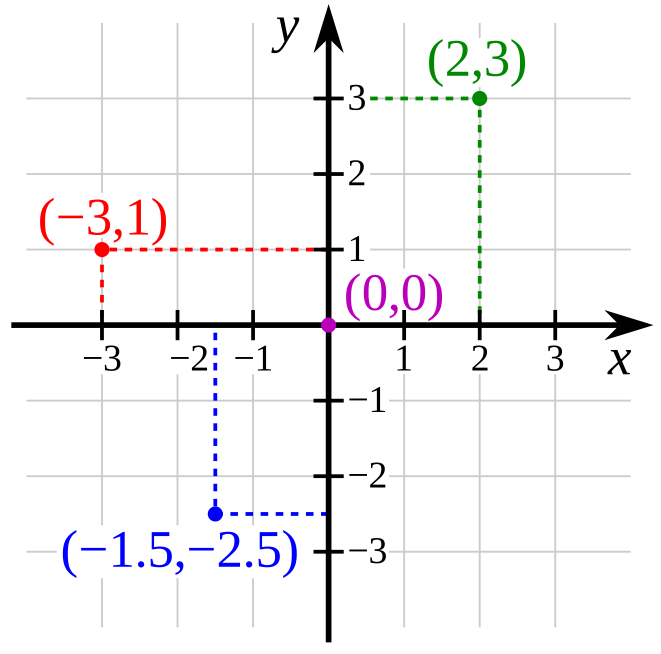
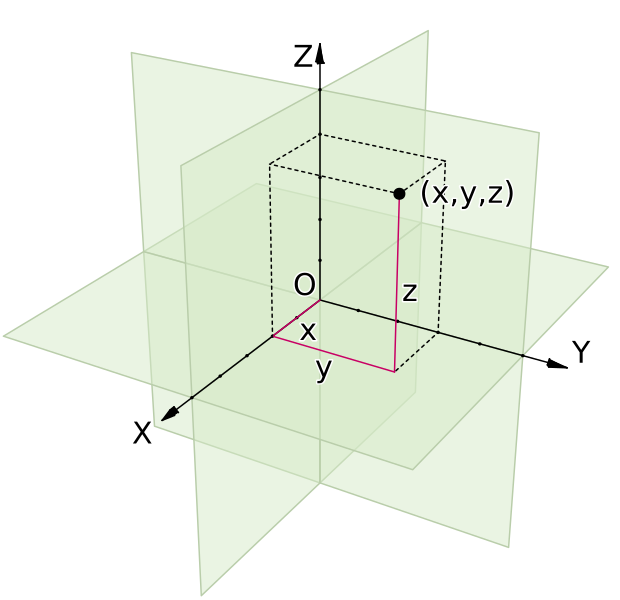
A 2D coordinate space, with four points labeledA 3D coordinate space, with one point labeled

Those right there are coordinate spaces. Both are defined by their origin (the center point) and the axes that pass through that origin. As the name implies, the origin acts as the starting point; everything in the space is relative to the origin. Then the axes determine distance and direction. By measuring along each axis in turn, you can place a point in space. For instance, (2, 3) means “2 units in the X direction and 3 units in the Y direction,” which is enough to precisely locate the green point.

Axis conventions

Oh right, each axis has a direction. The arrow on the axis points towards the positive numbers, and the other half of the axis is negative numbers. I like to use terms like “positive X” (or +X) and “negative Y” (or -Y) as shorthand for these directions.

By convention, the X axis goes left-to-right. In other words, -X is left, and +X is right.

The Y axis goes bottom-to-top in 2D, except that computer screens start in the top-left, so in computer graphics the Y axis goes top-to-bottom. I would guess that this stems from the old days when computers only displayed text. In English and similar languages, text starts in the top-left and goes down. The first line of text is above the second, and so on. It just made sense to keep that convention when they started doing fancier graphics.

In 3D, the Z axis is usually the one going bottom-to-top, while the Y axis goes “forwards,” or into the screen. Personally, I don’t like this convention. We have a perfectly good vertical axis; why change it all of a sudden?

In Runaway, I’ve chosen to stick with the convention established by 2D text and graphics. The X axis goes left-to-right, the Y axis goes top-to-bottom, and the Z axis goes forwards/into the screen. If I ever use Runaway for a 2D game, I want “left,” “right,” “up,” and “down” to mean the same things.

Not that it matters much. Runaway doesn’t actually enforce +Y meaning “down.” I wrote comments suggesting that it should, but because of the nature of the games I was building, I never hard-coded it. Instead, I coded ways to define your own custom coordinate spaces.

Rotated coordinate spaces

You know how different game engines can assign different meanings to different axes? Well in fact, each individual coordinate space can assign different meanings to different axes. In a single game, you can have one coordinate space where +Y means “down,” another where it means “up,” and a third where it means “forwards.”

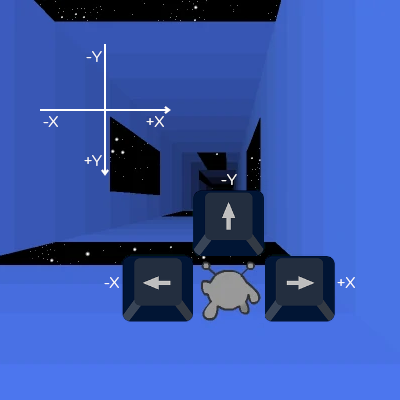
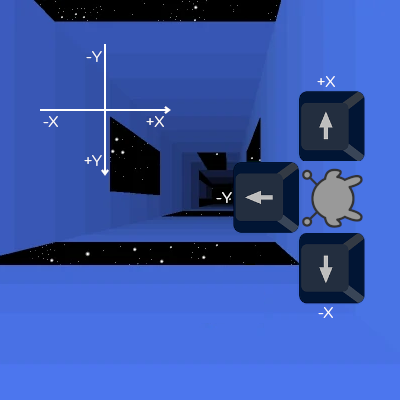
This brings us back to Run. I wanted to program character motion in a single, consistent coordinate space. I wanted to be able to say “the left arrow key means move in the -X direction, and the right arrow key means move in the +X direction,” and be done with it. Time for a couple images to show what I mean.

The Runner stands on the floor. There's a set of axes showing that -X is left, +X is right, and -Y is up, and a set of arrow keys showing the same.

Above is the basic case. You’re on the floor, and the arrow keys move you left, right, and up. If the game was this simple, I wouldn’t have anything to worry about.

The Runner stands on the right wall. The axes still show that -X is left, +X is right, and -Y is up, but now the arrow keys show -X being down, +X being up, and -Y being left.

Once you touch a wall, the Runner’s frame of reference rotates. She now has a distinct coordinate space, rotated 90° from our perspective. She can move around this space just like before: left arrow key is -X, right arrow key is +X, and jump key is -Y. It works great, until she has to interact with the level.

In her own coordinate space, she’s at around (-1, 2, 5). (Assuming 1 unit ≈ 1 tile.) In other words, she’s a bit left of center (X = -1) on the floor (Y = 2) of the tunnel. But wait a minute! In the tunnel’s coordinate space, the floor has a wide gap coming up quick. If the Runner continues like this, she’ll fall through! That can’t be right.

To fix this, we need to convert between the two coordinate spaces. We need to rotate the Runner’s coordinates 90° so that they match the tunnel’s coordinates, and then check what tiles she’s standing on. We end up with (2, 1, 5) – a bit below center (Y = 1) on the right wall (X = 2) of the tunnel. That wall doesn’t have a gap coming up, so she won’t have to jump just yet. Much better.

I have other use cases to get into, one of which is something I’m still working on and prompted this blog post. But I’ve spent long enough on this post, and I really should get back to the code. Perhaps next week.

How much content does infinite mode have?

Ah, procedural generation. The easiest way to add replay value to a game. Or is it?

Let’s talk about content and replay value, two vague but still useful measures of entertainment. (Note: Richard Stallman published a style guide telling everyone to stop calling artistic works “content.” This isn’t really important or relevant, I just find it amusing.)

The term “content” applies to most forms of online entertainment – games, movies, comics, art, and so on. The term “replay value” obviously only applies to games, because there really isn’t the same concept in other media. Sure, you can replay a video, and people do, but not as much and not for the same reasons.

Disclaimer: this post involves a lot of personal opinion and personal experience, moreso than usual.

Defining “content”

“Content” is a measure of something, but… what? (tl;dr at bottom)

Take YouTube videos. Those are widely agreed to be “content,” but does one video equal one content? No: a hundred 5-second videos aren’t a hundred times more content than a single long video. But it isn’t video length, either. A boring hour-long livestream can feel like less content than a few minutes’ worth of 5-second videos. It seems to be a combination of video count, length, level of detail, entertainment value, and (I would argue) release schedule. We’re more likely to refer to someone as a “content creator” if they release videos at semi-regular intervals.

In video games, all kinds of things count as content. Levels, characters, weapons, items, enemies, you name it. If players are excited to see more of a thing in the next update, they’ll probably call it “content.” (You may note the two media are slightly different – a YouTube video is a single indivisible piece of content, while a game is made up of many pieces of content. But I see that as an artifact of the medium. You can’t extend or modify YouTube videos after uploading, so we don’t talk about them in those terms.)

Games receive “content updates” from time to time, and one of the things players talk about is the size of these updates. The more changes made, the bigger the update. But “changes made” isn’t the metric being used. I’ve released content updates that took ages to make and still felt disappointingly small because players breezed through the levels in 15 minutes.

So… time spent? The more time you spend, the more content in a game? Well no. If that were true, idle games would have more content than any other game, followed by super-grindy RPGs. But we never talk about grinding as content; in fact, it’s almost antithetical. Idle games do have content, but the “content” comes in between grinding. When you unlock a new item or upgrade or whatever the game involves, there’s a period of adjustment, where you’re exploring the new possibilities. You have to figure out how to use this new thing effectively, and when you start to figure that out, you settle into your new grinding routine. Each new thing that makes you think is a piece of content.

So… is “making you think” the definition of content? Not quite, but it’s a lot closer.

tl;dr: I’d say the act of exploration – either literally exploring an area or figuratively exploring the possibilities of a game mechanic – is what defines content. The more time you spend exploring, the more content there is.

Defining “replay value”

Replay value is how many times you can replay a game (or part of a game) without feeling like you’re grinding. There are still some challenges to be had and discoveries to be made, even if you’ve already seen each location, item, and upgrade at least once.

At least, that’s the definition I’ll use here. Note that by this definition, replay value is a type of content. (In fact, I’m going to use the terms semi-interchangeably.) Either way, you’re exploring the game’s possibilities, and you aren’t grinding.

Defining “grinding”

Grinding is the act of replaying a game (or a section of a game) that you already thoroughly understand. It’s all about repetition and execution – you’re going to do this thing over and over again until you achieve some kind of goal.

When you fight weak enemies in an RPG to gain experience, that’s grinding. A particularly boring type of grinding, and hardly the only type. You can also grind an obstacle course, with the goal of eventually beating it. You can grind for resources by combing back and forth over the areas they most commonly appear. In rare cases, even a boss fight – supposedly the most exciting part of a game – can end up being a grind if the fight is slow or depends on randomness.

Speedrunning is (IMO) the most exciting form of grinding. Speedrunners will practice their maneuvers over and over to build muscle memory, and then spend even more time attempting full speedruns until everything comes together and they pull off all the tricks in a row. It’s a spectacular end result made possible only by replaying a game for hours, days, weeks, months, even years past the “replay value” stage. The speedrunner already found/did everything the developers intended them to find/do (content and replay value), and decided to press onwards (grinding).

To be fair, speedrunners also spend a fair amount of time experimenting, hunting for exploitable bugs and faster routes. This is a sort of exploration, not grinding, so it counts as content. It’s just content the developers didn’t intend to add.

Infinite Mode

Now that I’ve given my definitions, on to the two “infinite” modes. Both Run and Run 3 have a mode by this name, and though they’re different, I built them with the same goal: use randomness to add replay value.

Run 1’s Infinite Mode is simple. Each level is a random scattering of tiles. Not fully random – there’s a bias towards clumping together – but close enough. This produces a practically endless number of levels, but not an endless amount of content. Once you’re good enough to beat the highest difficulty, it takes only a few more run-throughs before you get used to everything the mode has to offer, and “replaying” becomes “grinding.” Ultimately, there isn’t a whole lot of content here.

In Run 3, the mode contains over 300 pre-made levels, which you encounter in a mostly-random order. This provides a much more varied experience, with each level having a distinct style and challenge. This is, unambiguously, a lot of content, and all it took was making 300+ levels by hand. Then there are a bunch of achievements that give bonus cash if you can beat levels in unusual ways, and upgrades to be purchased with this cash, and post-run statistics that provide tidbits of information on how you did. All this creates a much more replayable mode… in theory.

In practice, most of that stuff is for grinding, and therefore doesn’t count as “content” by my definition. The main culprit are the shop prices, some of which are astronomical. You’ll still be grinding for the Angel long past when you’ve seen most of the levels. This isn’t great design, and I know that, but in my defense, it’s supposed to be temporary.

Which brings us to the future of the two modes. In short, I want to add more content to both of them, building off what already exists. I want Run 1 to generate more interesting levels, and I want to make better use of Run 3’s existing 300+ levels.

The future of Infinite Mode in Run 1

For this mode, I want to start employing patterns. So many of my hand-made levels were made by creating a simple pattern, then repeating it. It shouldn’t be hard for a computer to do the same, even if it won’t do as good a job.

On top of that, adding an option to share random seeds will instantly increase add replay value. Not by adding new levels or anything; that’s what the patterns are for. No, seeds will make the existing levels more interesting to explore. Now you have more reason to pay attention to little details, because if you find an interesting randomly-generated level, you can save it for later and share it with friends.

For those out of the loop, computers rarely use truly-random numbers. Instead, they use complicated and unpredictable patterns to simulate true randomness. The mathematics are complicated, but all you really need to understand is they start with a seed: a single number serving as a starting point. And each time you start with the same seed, you’ll get the same “random” values in the same order. That would make Infinite Mode generate the same levels in the same order, down to the tile.

Well, kind of. Infinite Mode’s levels are based on two factors: randomness and difficulty. Difficulty is constantly changing based on the player’s performance, not based on the seed. You’d only get the same levels if the difficulty value happened to be the same. Fortunately, once you unlock a difficulty, you can go back and replay lower difficulties to see what you missed.

I think this will matter most to speedrunners. Now instead of each level being its own self-contained challenge, you’re playing a set of 100 connected levels, and you know them all in advance. You have to beat only about 10% of them, and the trick is to pick the easiest and fastest ones. So say you just beat difficulty 35 and jumped to 45, but you already know that 45 is annoying and inconvenient. You might choose to fall back to 44 and play that instead, even though that reduces your progress by 1 overall. That’s 100 levels’ worth of possibilities to explore, with almost no extra effort on my part.

tl;dr: I want to generate slightly better levels, and provide a way to replay ones you like. Both would add a modest amount of replay value.

The future of Infinite Mode in Run 3

I have multiple plans for this mode. I want to make the levels more interesting in and of themselves. I want to expand the upgrade system, including upgrades to income (so the Angel doesn’t take so ridiculously long). I want to arrange the levels in more interesting ways, with occasional choice points. I want more risk-reward tradeoffs.

I plan to make the levels more interesting by adding, removing, or moving tiles. The same sort of thing that Run 1 does, except less random. This doesn’t add much new content, as the levels will be mostly the same, but it’ll keep players from getting complacent.

Everything else – upgrades, choice points, tradeoffs – will be bona fide new content, and will take a lot of effort to design. Each will introduce new strategic choices, at different levels of gameplay. Tradeoffs happen in the moment, and you succeed or fail after a few seconds. At a choice point, you commit to a branch of the tunnel, and that branch determines the next several levels. It’s a higher-level decision with longer-lasting consequences. Upgrades happen before you even set out, and affect an entire run, creating some meta-level gameplay where you decide what to bring.

Each higher-level decision will affect the lower-level ones, creating more possibilities to explore. As an example, suppose one of the upgrades is a flashlight. If you bring that along, you might feel more comfortable venturing into a low-power branch of the tunnel, because you’d still be able to see a little. But then once you’re there you come across a long-jump challenge, and you decide not to attempt the jump because the flashlight doesn’t reach that far. Instead you go around and pass up that reward. If only you’d brought a mobility upgrade in place of the flashlight… but in that case would you have risked coming to the low-power branch?

tl;dr: There’s still a lot of potential to spice up Run 3’s Infinite Mode, and I plan to do it by adding game mechanics. Adding a few more levels won’t make much difference, but new mechanics will add replay value to all 300+ levels simultaneously.

What is Runaway?

I’ve been working on Runaway since (at least) 2019, and talking about it in vague terms for about that long. But what is Runaway, really?

Before getting started, let’s clear up some terminology. Runaway is a game engine, named after Run (the game series) and Away3D (the 3D rendering library). The Runway is a tunnel in Run 3 that hasn’t been released. Despite the similar names, there’s no connection.

Overview of Runaway

A game engine is a collection of code designed to help people write games. You may have heard of engines such as Unity, Unreal, or GameMaker. Haxe – the language I named this blog after – has engines such as HaxeFlixel, HaxePunk, and/or Armory. All of these are designed to serve as a solid foundation for making games, saving you the time of re-writing your physics and rendering code each time.

Which is an odd thing for me to worry about, since I’ve never been afraid to re-write my physics and rendering code, or anything else really. Each game in the Run series was re-written from the ground up, and Runaway is its own ground-up rewrite. Though it’s taken years, I’ve learned a lot each time, and I’m building Runaway because I finally feel ready to build a standalone game engine, separate from the games themselves.

Entity-component-systems

So what sets Runaway apart from all the other engines? The big difference is, it uses an entity-component-system model. This model isn’t strictly better or worse than conventional engines, but to me it feels more elegant. (And if I’m being honest, the aesthetics are what won me over.) Practically speaking, the model lends itself to loose coupling, meaning Runaway should be especially versatile.

As the name implies, there are three important pieces here:

  • Entities are, you know, things. They can be anything from the tangible (characters, obstacles, items) to the vague (load triggers, score trackers), depending on what components they have.
  • Components are properties of entities. Things like position, size, shape, AI, abilities, and appearance. Each component is a small piece of data, and entities can have as many as needed. Note that components are nothing but passive data storage. They don’t act or update on their own.
  • Systems run the actual code that updates entities and components. Each system looks for a certain set of components, and updates only the entities with that set.

That’s the magic of the ECS model: what you are (an entity’s components) determines what you do (a system’s code).

Alice and Bob

Let’s walk through an example to see this in action.

var alice = new Entity();
var bob = new Entity();

Right now, Alice and Bob have nothing but a unique ID (Alice is 0 and Bob is 1). They aren’t characters yet. I’d describe them as “floating in a void”, but they can’t even do that because they don’t have positions. Let’s fix that.

alice.add(new Position(0, 0, 0));
bob.add(new Position(5, 0, 0));

Now that we gave them Position components, they’re floating in an endless void, doing nothing. How about a race?

alice.add(new Velocity(0, 0, 0));
alice.add(new Acceleration(0, 0, 1));
bob.add(new Velocity(0, 0, 10));

With the addition of new components, they immediately spring into action! Bob takes a commanding lead, at a speed of 10 units per second. Alice, meanwhile, accelerates slowly at 1 unit per second. Even after 5 seconds, she’s only moving at half Bob’s speed and has traveled only 12.5 units, compared to Bob’s 50. Bob will continue to widen the gap between them over the next several seconds, but his speed is fixed. As Alice continues to accelerate, it’s only a matter of time before she overtakes him.

But where is the code for this? Alice and Bob’s positions are changing every frame, even though Position, Velocity, and Acceleration components are nothing but data. It’s because Runaway has a class called MotionSystem, that was waiting all this time for these components to show up.

class MotionSystem extends System {
    @:update private function accelerate(acceleration:Acceleration, velocity:Velocity, time:Float):Void {
        velocity.x += acceleration.x * time;
        velocity.y += acceleration.y * time;
        velocity.z += acceleration.z * time;
    }
    
    @:update private function move(velocity:Velocity, position:Position, time:Float):Void {
        position.x += velocity.x * time;
        position.y += velocity.y * time;
        position.z += velocity.z * time;
    }
}

For those unfamiliar with Haxe, these are two “functions” named accelerate and move. The accelerate function takes three “arguments”: acceleration, velocity, and time, and it modifies velocity. The move function takes velocity, position, and time as arguments, and it modifies position.

Because these functions are marked @:update, they will automatically run once per entity per frame, but only if the entity in question has the correct components. Ignore time (it’s always available), but the other arguments must match. That means having a Position component isn’t enough, because move also requires Velocity. (Just Velocity wouldn’t be enough either.)

Now that Alice and Bob have both components, the move function automatically updates Position each frame. Alice also has an Acceleration component, so she meets the criteria for the accelerate function, and therefore accelerates as well.

While the physics described here aren’t anything impressive, the important thing to notice is how easy it is to add (or not add) functionality to an entity. Acceleration is baked into most physics engines, but in Runaway, it’s totally optional.

This is why I consider Runaway to be flexible. I can write extremely specific code, tailored to all kinds of specific situations, and then pick and choose which to apply to which entity.

Runaway’s current status

As of 2021, Runaway is being used in a single game: Run 1’s HTML5 port. It has all the features needed for that simple game, and a few more, but it’s also missing things I’ll need going forwards.

One of the improvements I need to make is the loading system. The current system requires pre-determined levels, such as the 50 levels in Run 1. But Infinite Mode generates levels on the fly, with difficulty based on your performance in the previous level, and that requires something more flexible.

I do hope to release the engine at some point, just not for a while. First I want to complete multiple games, including at least one not in the Run series, to be sure it’s stable and versatile enough to compete with the existing engines.

Status update: summer 2021

Lately, I’ve been focusing on low-level engine changes, such as “how things get loaded.” I’m building Runaway (the engine) to be as general as possible, with an eye towards reusing it in future games, and perhaps also releasing it. (Though I realize there are more than enough game engines out there already.)

When I finish the loading code, my next target will be restoring Infinite Mode to Run 1. The currently-released load system prepares levels well in advance, but in Infinite Mode, each level is generated based on your performance in the previous one, so I need to be able to fine-tune loading.

After that, my plans include, in no particular order:

  • Some quick gameplay changes for Run 1.
  • Some not-so-quick animation changes for Run 1.
  • Rewriting Run 2 for Runaway, which hopefully shouldn’t take long.
  • Rewriting Run 3/Run Mobile for Runaway, which is going to take a while but still needs to be done by November. Fingers crossed!